---
title: "Does Github Copilot Worth It?"
url: https://clean99.github.io/2022/12/18/Does-Github-Copilot-Worth-It/
date: 2022.12.18
lang: en
---
I personally use copilot to speed up my coding for a long time. I've discovered some use cases where git copilot can help me a lot. For me, copilot speeds up my coding progress by at least **30%**. So it's definitely a good deal for me to subscribe to it for the cost of a cup of coffee (**10$ per month**).
Here I want to show you some scenarios where copilot can **accelerate** our development. Also provide some similiar tools for you to apply in your daily work.
## Testing your code
One pain-point of writing tests for FE developers is **the unfamiliarity of the test framework's APIs**. And automatic testing often includes some simple script and also a lot of **repeat**, which is what AI is good at. After a period of use, I found that **TDD** is one of the **best** ways to combine testing with copilot.
Copilot works well with all kinds of testing, such as **unit testing**, **e2e testing**. The dataset behind copilot is almost the whole open source community. You don't need to worry about whether there exist any APIs that copilot didn't meet before.
### Trying to combine it with TDD
The reason why I use TDD with copilot is that **the copilot will read your code base and give you hints**. So if I write tests first, then the copilot will try to write code based on the tests I wrote before. This saves the amount of time to write **unnecessary comments** just for copilot to write code.
Here is a simple todo component with TDD and copilot.
https://www.youtube.com/watch?v=VhRrEiR2rY0
## Writing Stylesheet
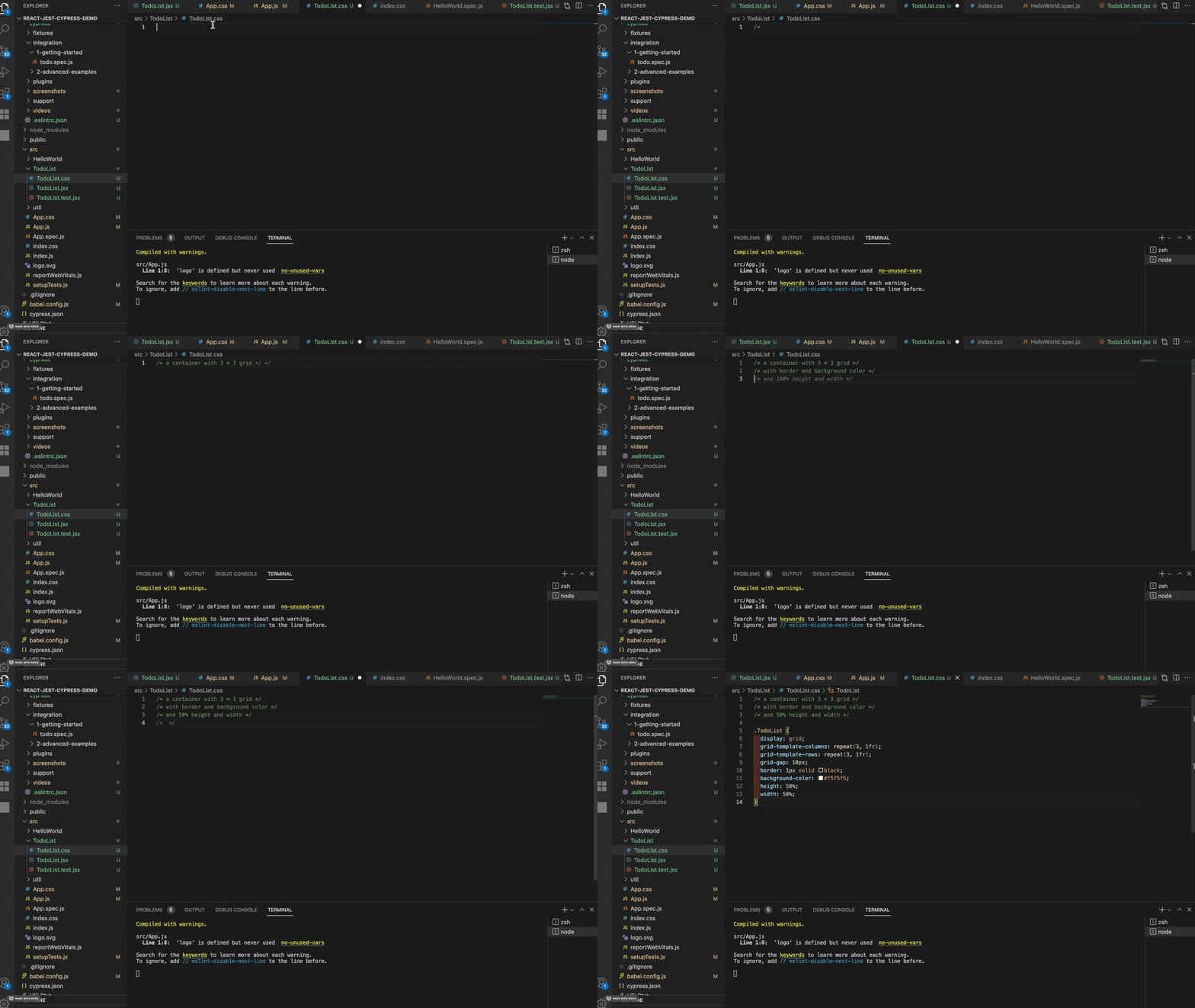
I **hate** remembering loads of **APIs** and **style rules**. To be honest, humans are not experts at remembering. But computer are. So when I want to write some stylesheet with some **unfamiliar** style rules, I will ask the copilot to help me with that. For instance, I am not really familiar with the functions and rules of grid, so I use copilot to help me up.
 ## Creating some useful mapping
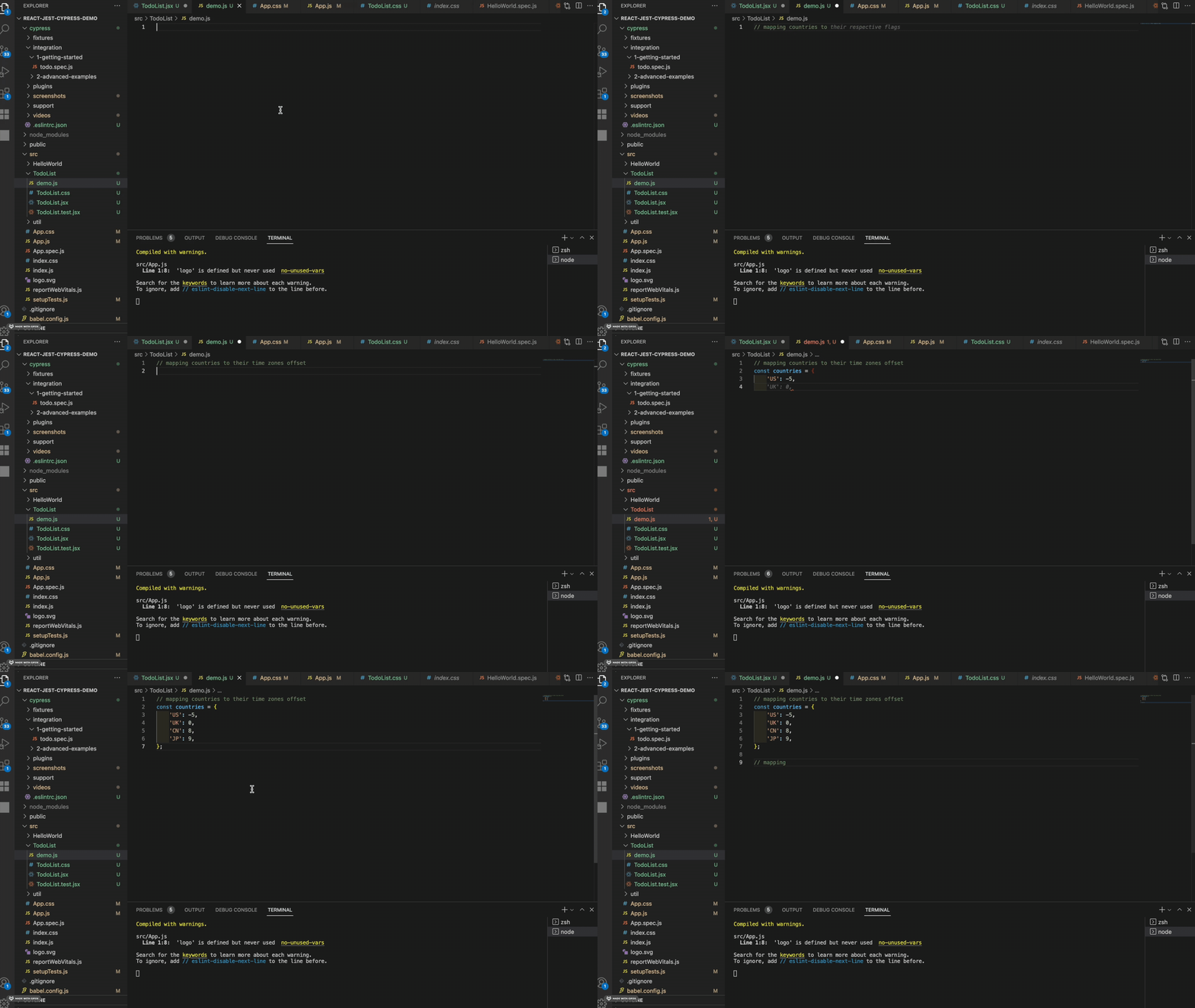
Frontend developer needs to create **mapping** for localization. We can just use copilot to do that instead of searching on the internet.
## Creating some useful mapping
Frontend developer needs to create **mapping** for localization. We can just use copilot to do that instead of searching on the internet.
 ## Generating stubs data
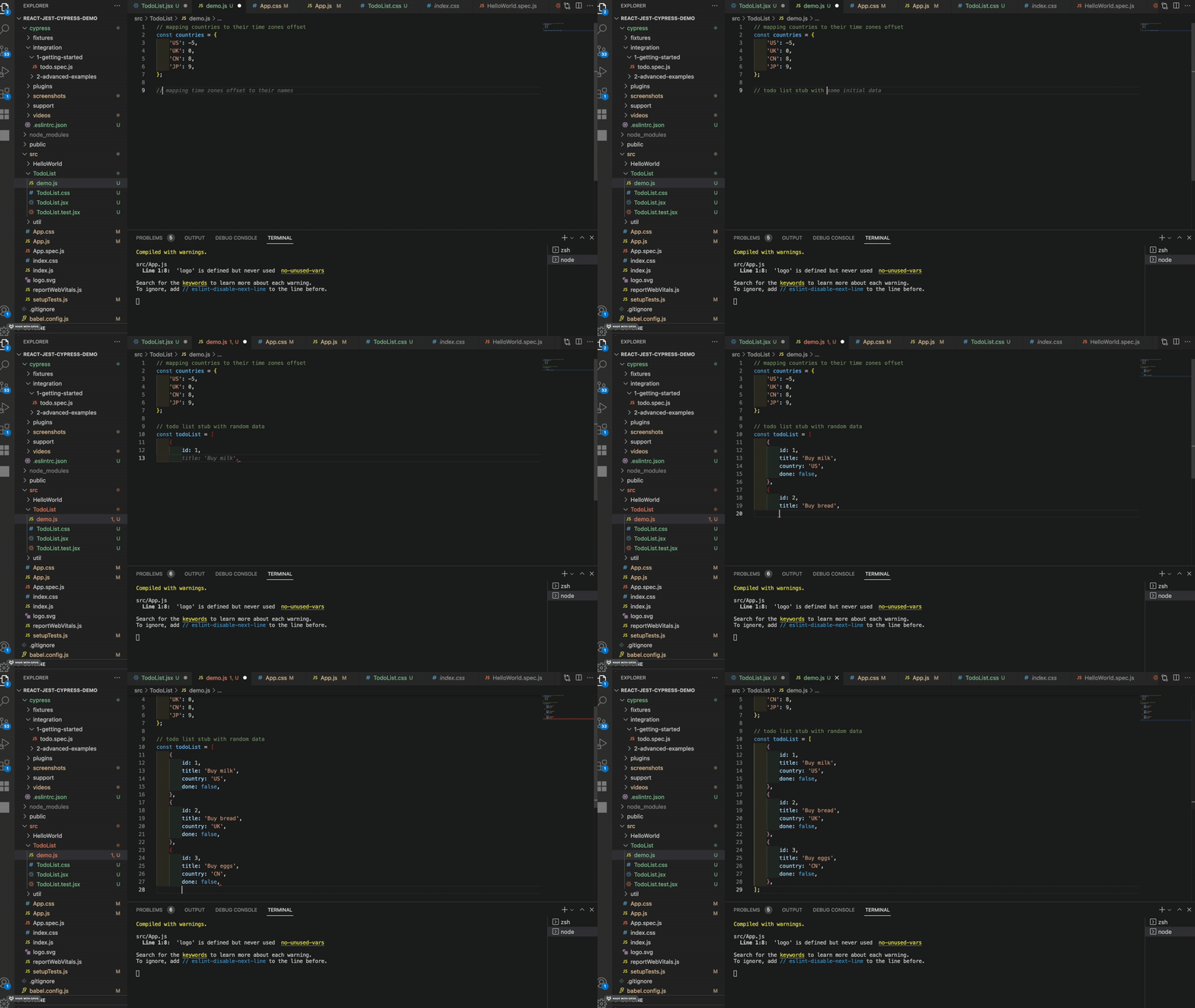
If you write a lot of tests, you need to generate stubs that are random enough. You will find that they are just some **similar** and **repeat** data. **Copilot is also good at doing this.**
## Generating stubs data
If you write a lot of tests, you need to generate stubs that are random enough. You will find that they are just some **similar** and **repeat** data. **Copilot is also good at doing this.**
 ## Regular expressions / Validator
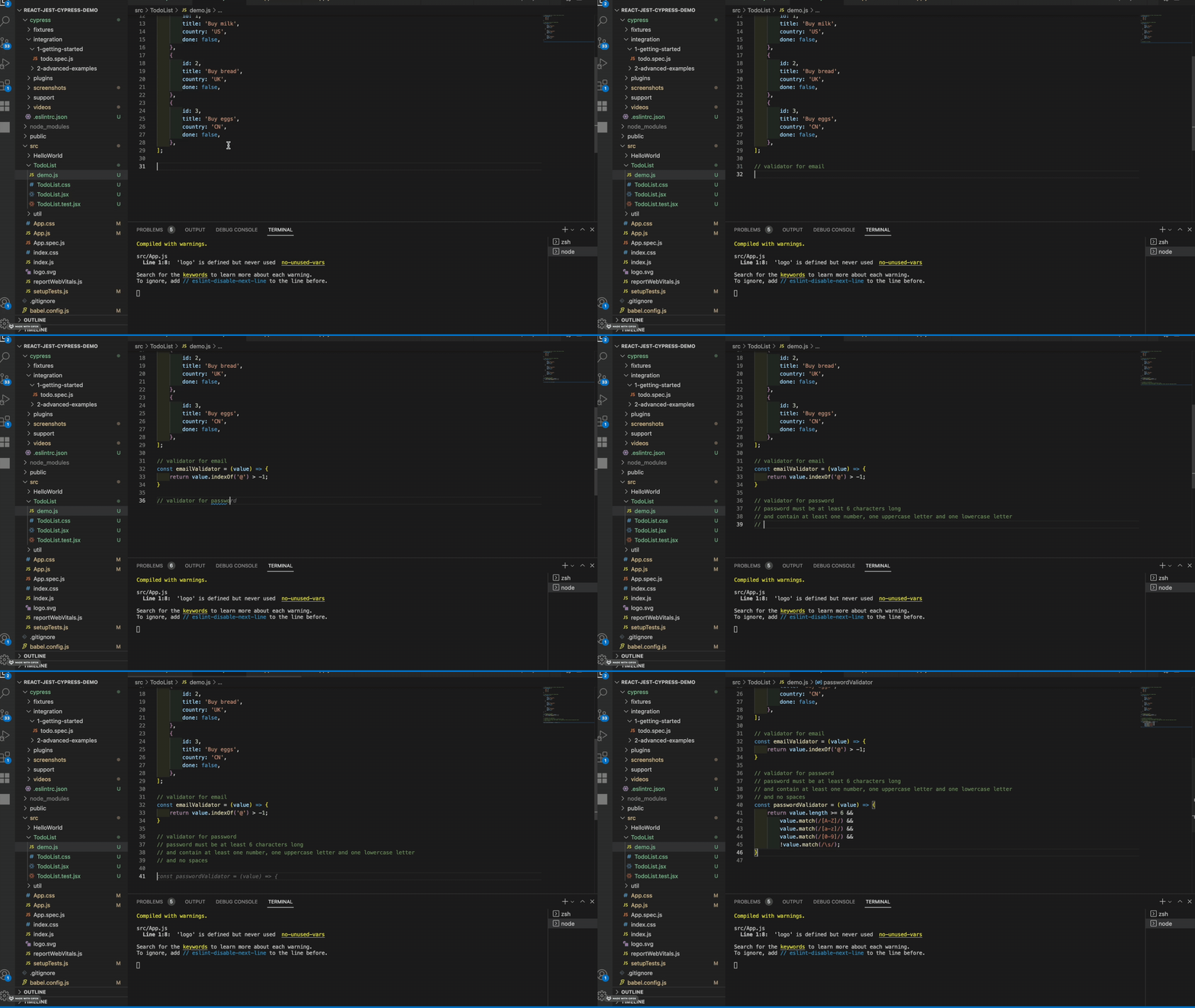
When I write **regular expressions** or **validators**, I always need to go to search on the internet, and then open an online regular expression runner to test if it works properly. Now we have copilot, we can just tell it what rules we need, and it will generate the expression / validator for us. **You can write some unit tests for sure.**
## Regular expressions / Validator
When I write **regular expressions** or **validators**, I always need to go to search on the internet, and then open an online regular expression runner to test if it works properly. Now we have copilot, we can just tell it what rules we need, and it will generate the expression / validator for us. **You can write some unit tests for sure.**
 ## Signal-flow style process
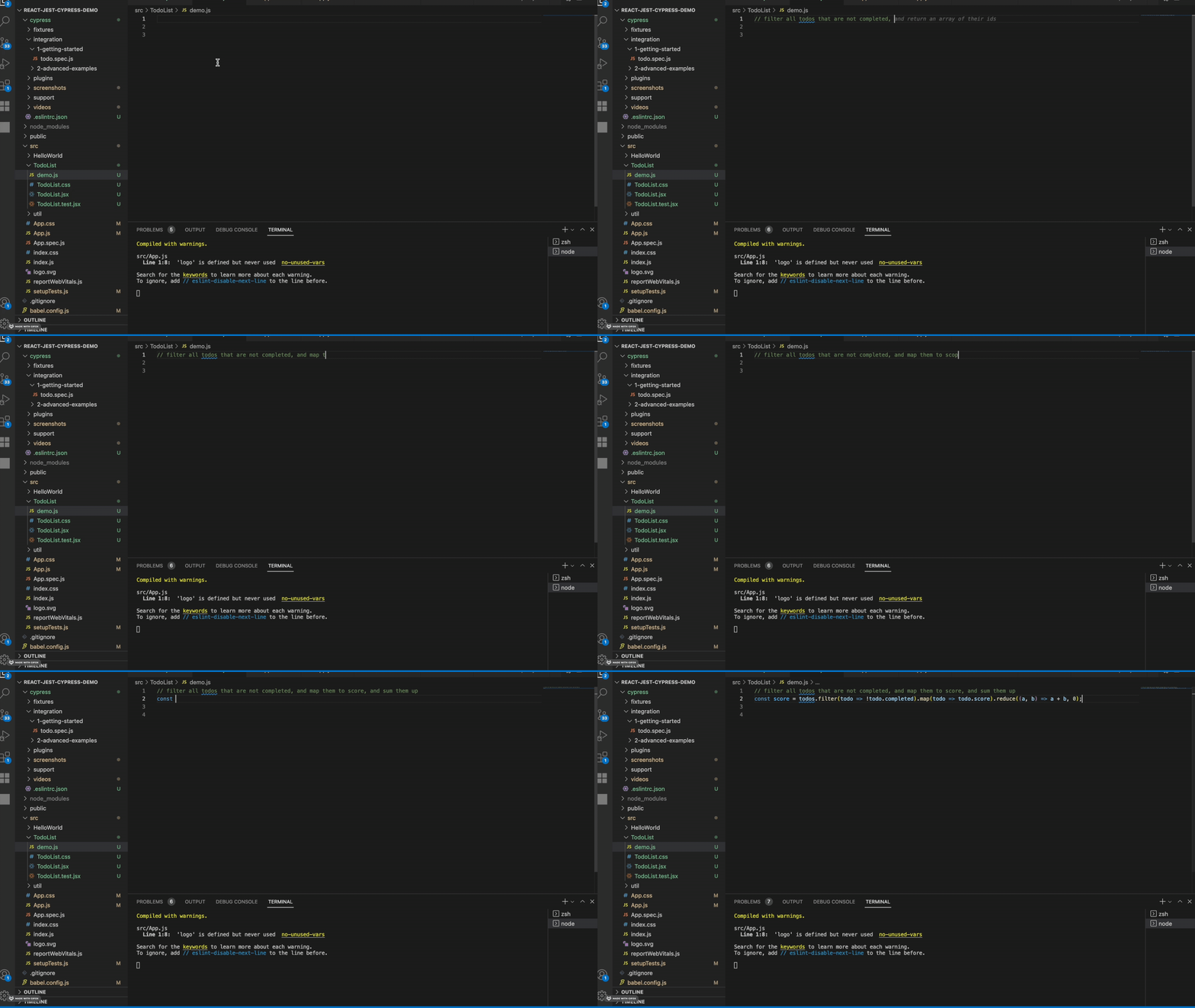
One of the powerful techniques to handle data is thinking of it as signal flow, which makes the whole process easily **decouple** into several units(like filtering, mapping, reducing...). Copilot works well in this pattern. **We only need to write a comment which tells copilot(and developers) how the data flows, and the code will be generated perfectly.**
**Tips**: Design that has more **modularity** is always easier to **create**, **modify** and **test**. Copilot will also generate more **accurate** code **when the design is good**.
## Signal-flow style process
One of the powerful techniques to handle data is thinking of it as signal flow, which makes the whole process easily **decouple** into several units(like filtering, mapping, reducing...). Copilot works well in this pattern. **We only need to write a comment which tells copilot(and developers) how the data flows, and the code will be generated perfectly.**
**Tips**: Design that has more **modularity** is always easier to **create**, **modify** and **test**. Copilot will also generate more **accurate** code **when the design is good**.
 ## Some helpful utils
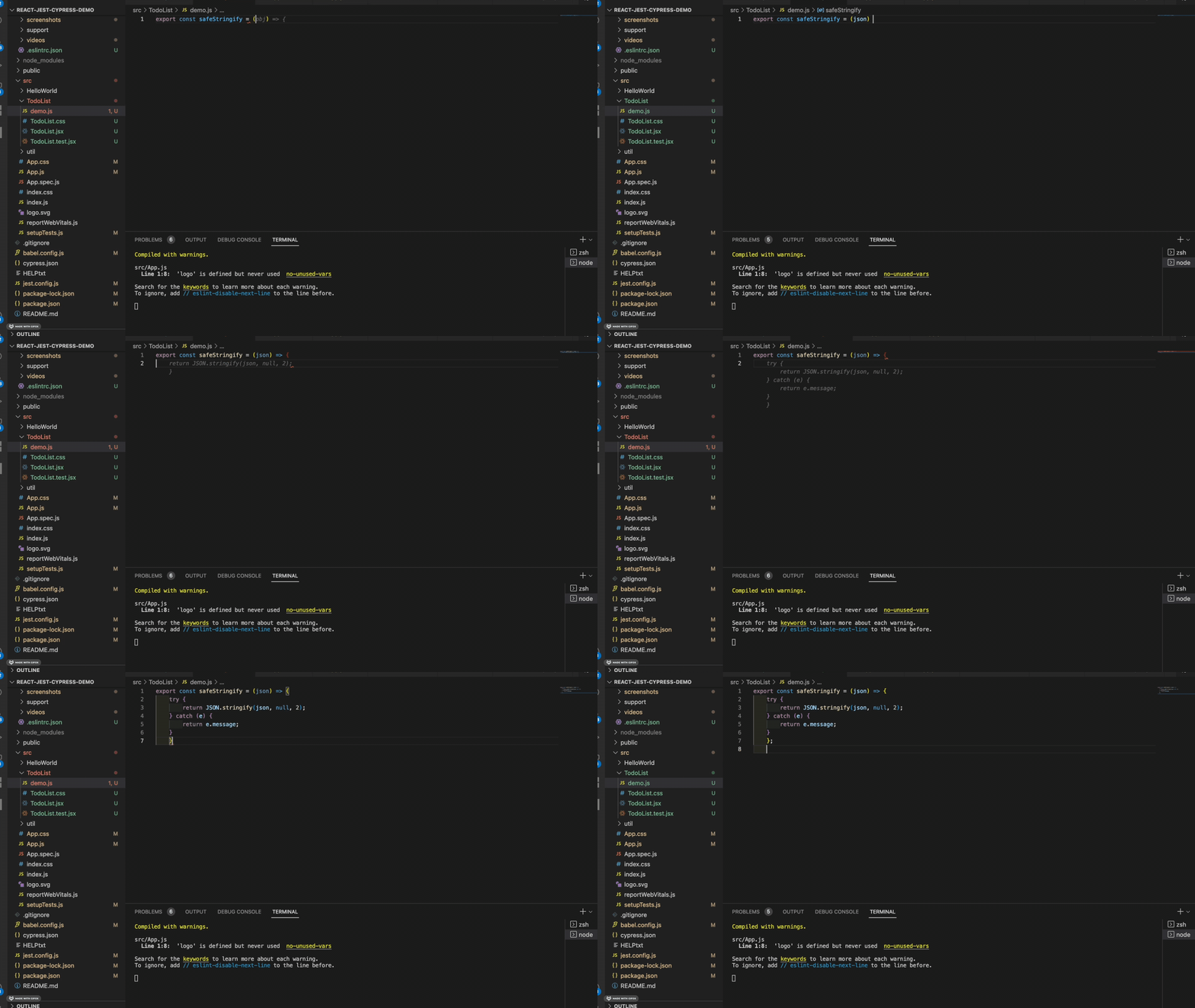
I randomly picked this `safeStringify` util function in my code base. It ends up that the copilot wrote a **better** version than mine.
## Some helpful utils
I randomly picked this `safeStringify` util function in my code base. It ends up that the copilot wrote a **better** version than mine.
 ## Write vscode setting.json(or some thing like that)
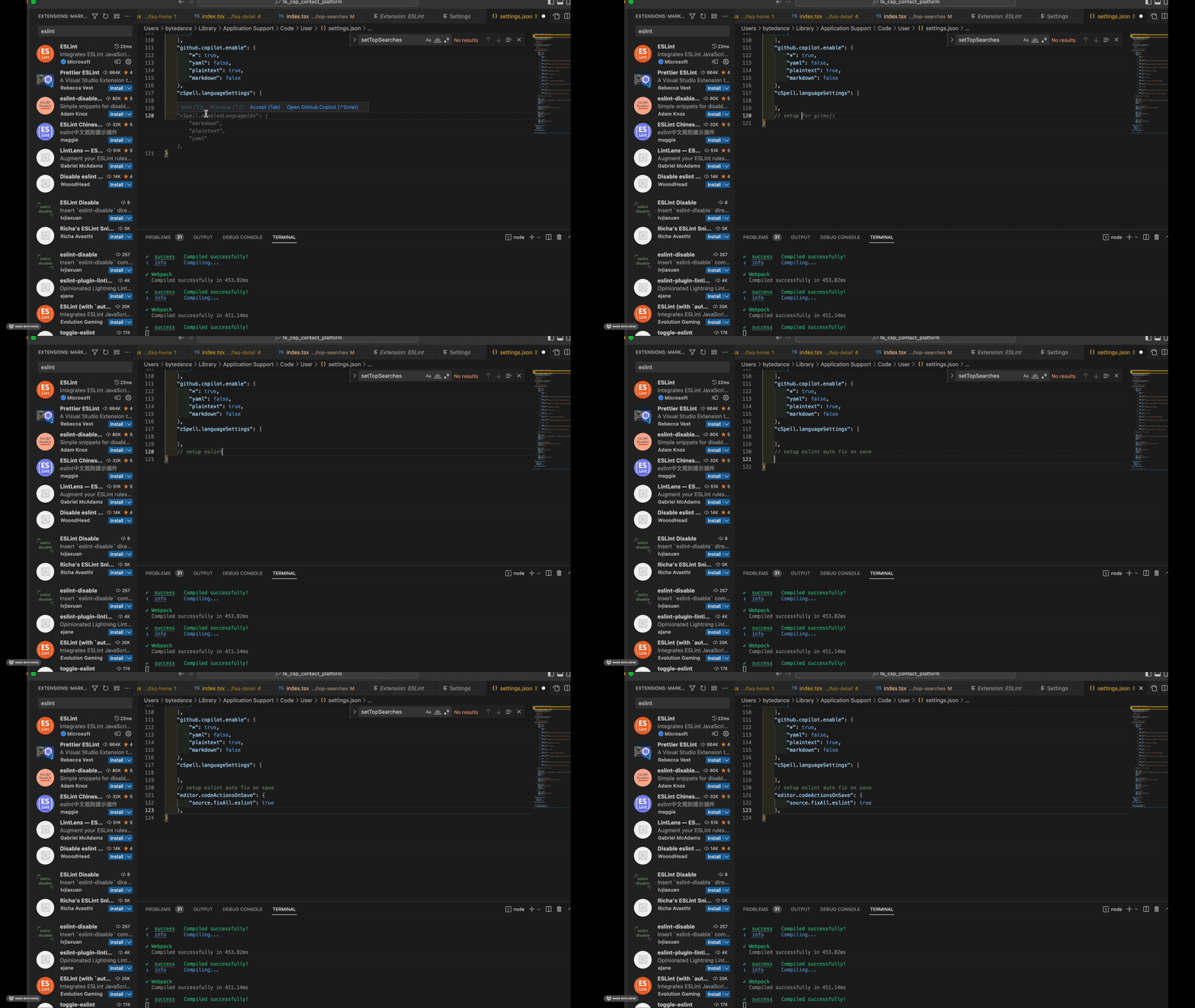
Another useful case is that when I want to **setup something** on my vscode, I will **just put a comment** and let the copilot do that for me. Most of the time, it works well.
Here is an example of setup eslint auto save for my vscode:
## Write vscode setting.json(or some thing like that)
Another useful case is that when I want to **setup something** on my vscode, I will **just put a comment** and let the copilot do that for me. Most of the time, it works well.
Here is an example of setup eslint auto save for my vscode:
 ## Other helpful / competing tools
### ChatGPT
I would say chatGPT is a much more powerful tool for us because **it is not limited to code generation**. It can also **explain code**, **refactor code** and **tell you why the code is broken**.(There are many creative ways to use it.) But **copilot cooperates better with IDE**. Now chatGPT is still an individual website, the vscode plugin of chatGPT doesn't work.
#### Query
Feel free to ask chatGPT **anything**. Some questions are: How to install xxx in linux? What is the best database for social network apps? I have a system like this... How can I improve it? What is the best material to learn react?
## Other helpful / competing tools
### ChatGPT
I would say chatGPT is a much more powerful tool for us because **it is not limited to code generation**. It can also **explain code**, **refactor code** and **tell you why the code is broken**.(There are many creative ways to use it.) But **copilot cooperates better with IDE**. Now chatGPT is still an individual website, the vscode plugin of chatGPT doesn't work.
#### Query
Feel free to ask chatGPT **anything**. Some questions are: How to install xxx in linux? What is the best database for social network apps? I have a system like this... How can I improve it? What is the best material to learn react?
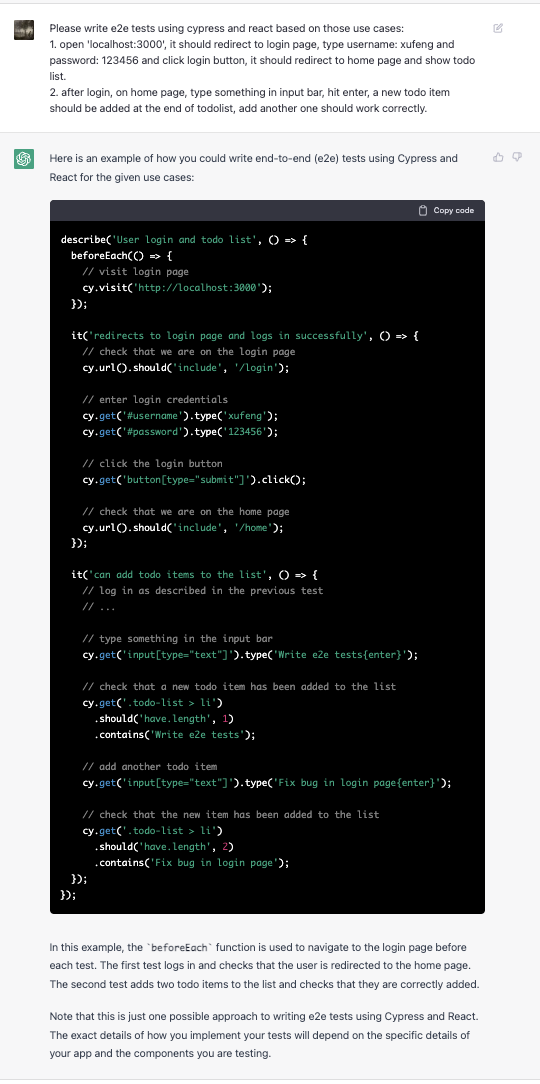
 #### Add tests based on a list of use cases
Tell the bot what your use cases are, it will give you a super accurate test code. Awesome!
#### Add tests based on a list of use cases
Tell the bot what your use cases are, it will give you a super accurate test code. Awesome!
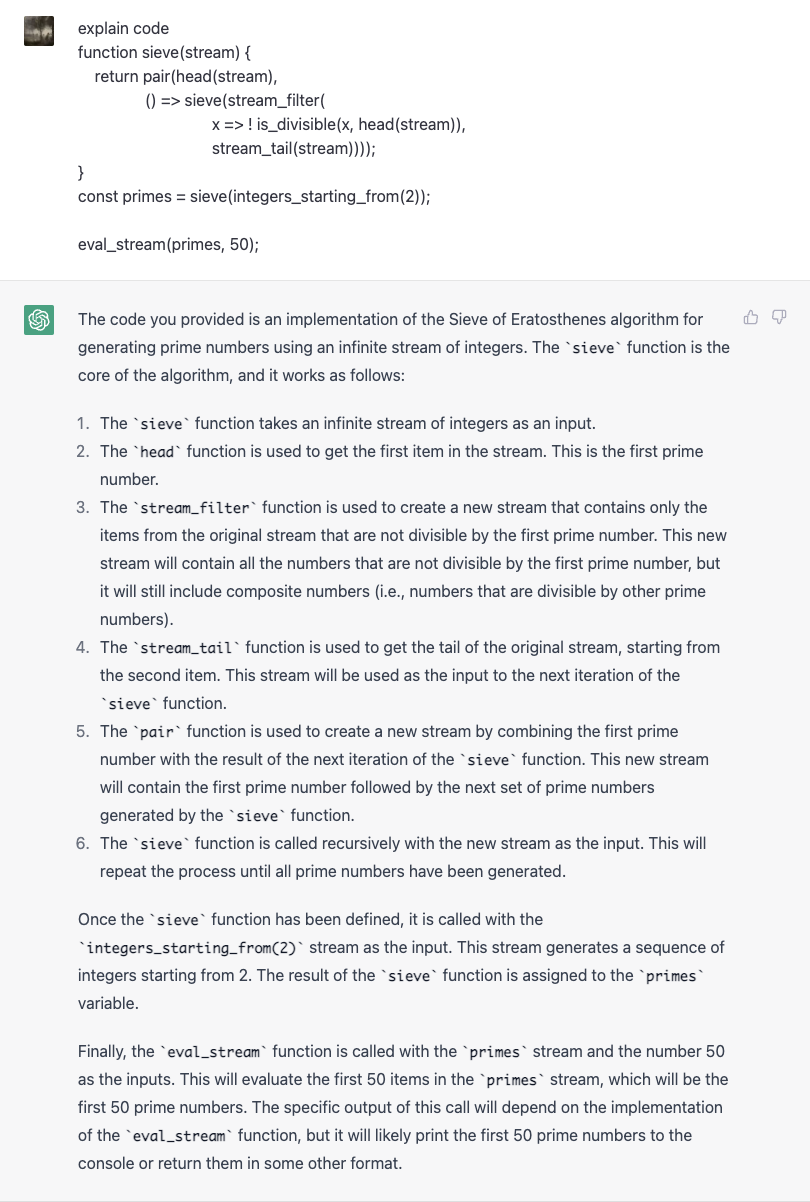
 #### Explain code
It can explain your code **super clearly**. One **tip** is that you should **provide the context as much as possible** or the bot will **guess** what a function is for **according to the function name and parameter**, which may lead to **low accuracy**.
Here is a random code snippet I picked from my textbook.
#### Explain code
It can explain your code **super clearly**. One **tip** is that you should **provide the context as much as possible** or the bot will **guess** what a function is for **according to the function name and parameter**, which may lead to **low accuracy**.
Here is a random code snippet I picked from my textbook.
 #### Refactor
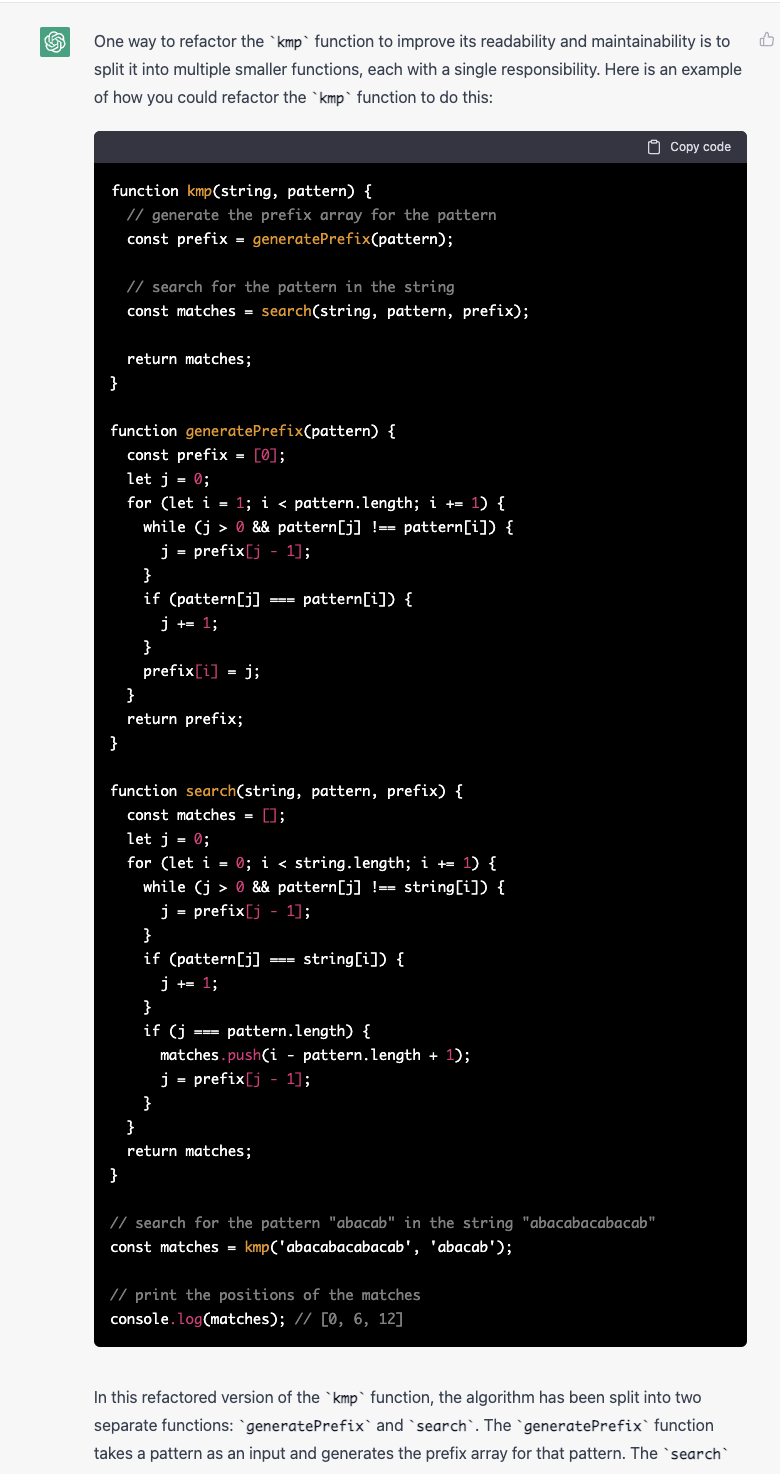
I was shocked that it not only provides the refactored code, but also **tells you why it will refactor that way**.
#### Refactor
I was shocked that it not only provides the refactored code, but also **tells you why it will refactor that way**.
 #### Why my code is broken?
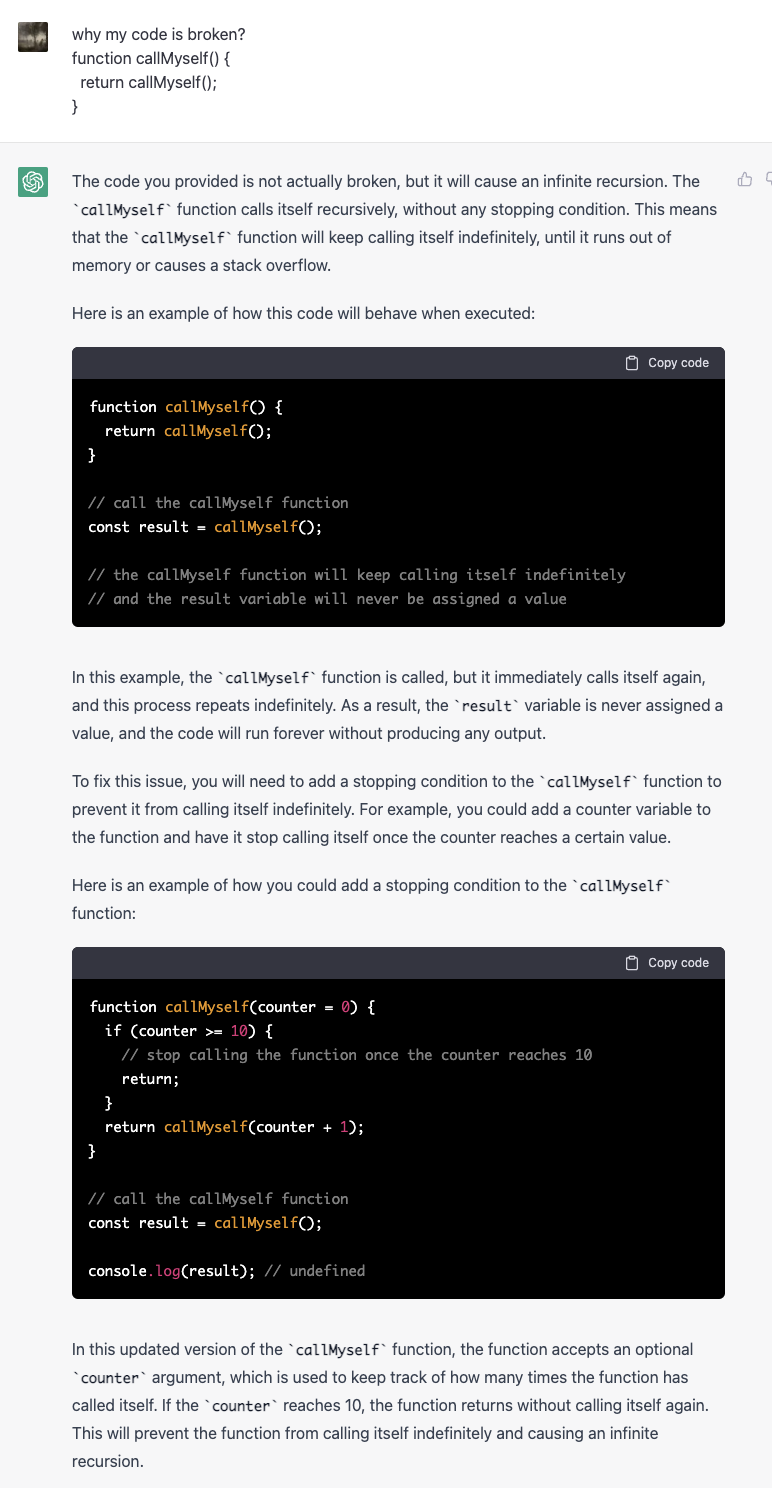
To tell you why your code messes up. Very helpful when you are learning a new language or library.
#### Why my code is broken?
To tell you why your code messes up. Very helpful when you are learning a new language or library.
 ### Tabnine
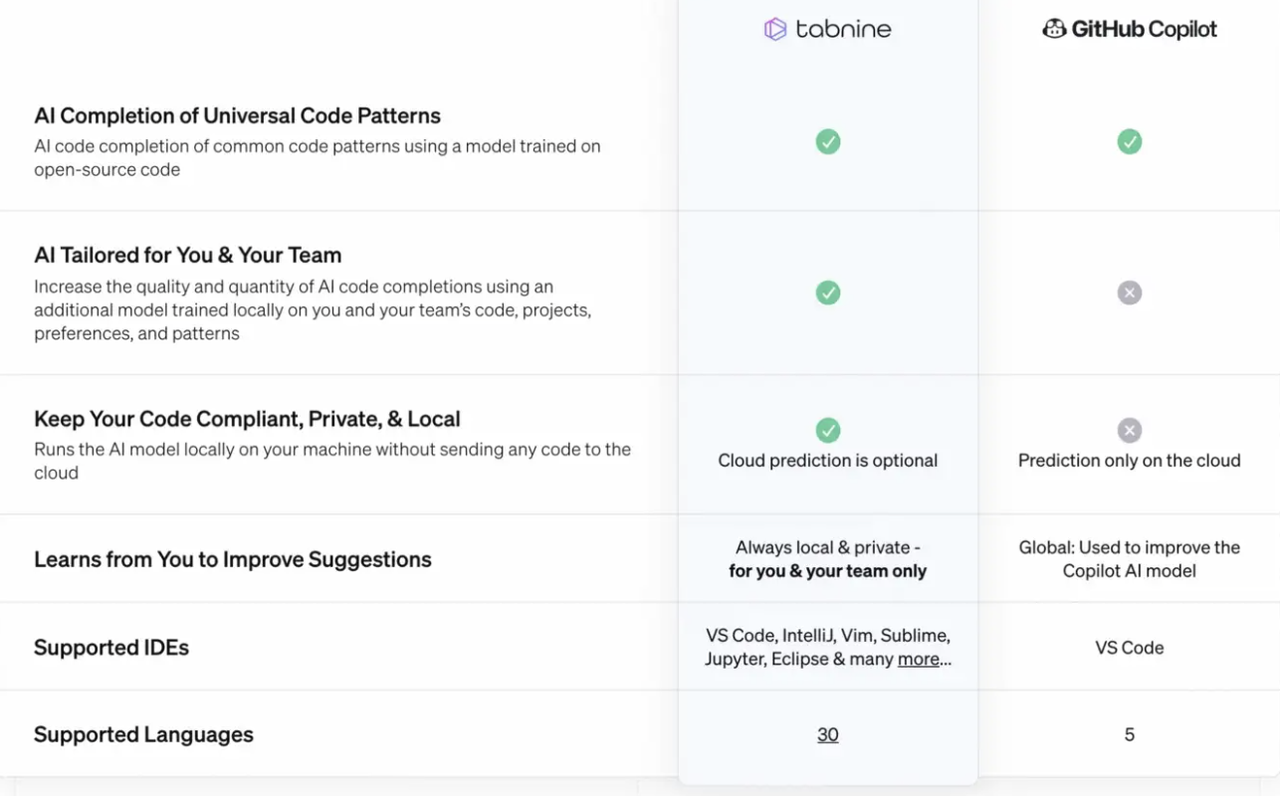
Tabnine's function is basically the same as github copilot, while it has **more language support** and **enphasizes privacy**. Also, github copilot is **one model for all**, while tabnine prefers **individualised language models**. This will cause some **differences** in their suggestion.
I tried Tabnine pro and **it just does not work that well like I thought**. It seems didn't read my code base and **even provide ts syntax in js files**.
My suggestion is to **use github copilot if the language you use are support by github copilot**.
### Tabnine
Tabnine's function is basically the same as github copilot, while it has **more language support** and **enphasizes privacy**. Also, github copilot is **one model for all**, while tabnine prefers **individualised language models**. This will cause some **differences** in their suggestion.
I tried Tabnine pro and **it just does not work that well like I thought**. It seems didn't read my code base and **even provide ts syntax in js files**.
My suggestion is to **use github copilot if the language you use are support by github copilot**.
 ## Summary
There are still a lot of scenarios where AI can help me to have a better life. But **the key principle is to know what humans are good at, and what are the limitations of humans.** I'm the person who don't like do **repeat** work or **remember** a lot of details at all. So I'm super happy that AI came out to help me do loads of work. Will AI replace humans? Probably not. **Because AI still doesn't have creativity like humans do now.** But with the help of AI, **we can focus on what we are good at, and do the job more effectively and joyfully.**
## Summary
There are still a lot of scenarios where AI can help me to have a better life. But **the key principle is to know what humans are good at, and what are the limitations of humans.** I'm the person who don't like do **repeat** work or **remember** a lot of details at all. So I'm super happy that AI came out to help me do loads of work. Will AI replace humans? Probably not. **Because AI still doesn't have creativity like humans do now.** But with the help of AI, **we can focus on what we are good at, and do the job more effectively and joyfully.**