---
title: "Build a Redux from Scratch(Redux Source Code Review)"
url: https://clean99.github.io/2023/11/28/build-a-redux-from-scratch/
date: 2023.11.28
lang: en
---
> A state is nothing more than a getter/setter.
## What You Will Learn From This Article
1. **Redux and React-Redux Design and Implementation**: This article provides a deep dive into the design and implementation of Redux and React-Redux, demonstrating how they manage application state and facilitate communication between components.
2. **State Management (Getter, Setter)**: You will understand the fundamental pattern of state management and be able to understand any other state management tools.
3. **Publish/Subscribe Design Pattern**: This article explains the publish/subscribe pattern, a key concept in Redux's state update and notification mechanism.
## What is Redux?
Redux is a predictable state container for JavaScript apps. It's like a more powerful version of React's state. While React's state is limited to each component, Redux allows you to manage the state of your entire application in one place.
Redux solves this problem by storing the state of your entire application in a single JavaScript object within a single store. This makes it easier to track changes over time, debug, and even persist the state to local storage and restore it on the next page load.
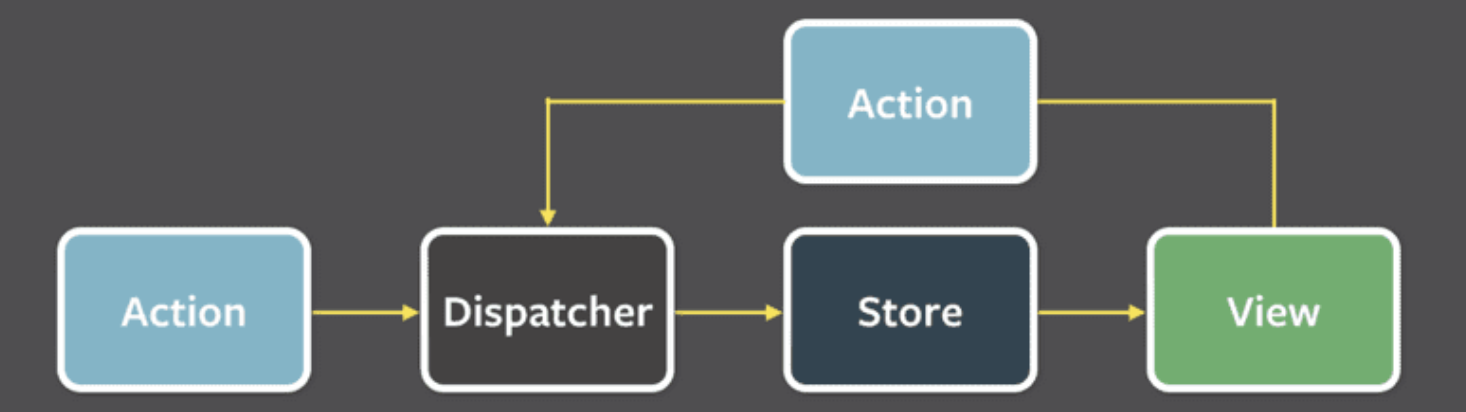
Redux contains these several components:
- **Action**: A plain object describing what happened and the changes to be made to the state.
- **Dispatcher**: A function that takes an action object and sends it to the store to change the state.
- **Store**: The central repository that holds the state of the application. It allows access to the state, dispatching actions, and registering listeners.
- **View**: The user interface that displays the data provided by the store. It can trigger actions based on user interactions.
If some action on the application, for example pushing a button causes the need to change the state, the change is made with an action. This causes re-rendering of the view.
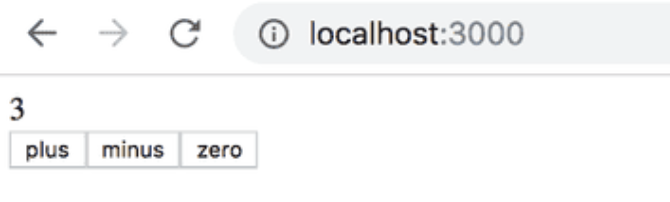
Let's take a look at the implementation of a counter:
The impact of the `action` on the state of the application is defined using a `reducer`. In practice, a `reducer` is a function that is given the current state and an action as parameters. It returns to a new state.
Let's now define a `reducer` for our application:
```js
// the first state is the current state in store, and the function return
// a new state after action.
const counterReducer = (state, action) => {
if (action.type === 'INCREMENT') {
return state + 1;
} else if (action.type === 'DECREMENT') {
return state - 1;
} else if (action.type === 'ZERO') {
return 0;
}
return state;
}
```
And an `action` is like this:
```js
{
type: 'INCREMENT',
}
```
With the `reducer`, we can use `redux` to define a `store`.
```js
import { createStore } from 'redux';
// initial state is 0
const counterReducer = (state = 0, action) => {
// ...
};
const store = createStore(counterReducer);
```
A `store` has two core methods: `dispatch`, `subscribe`. A function can be `subscribe` to a store, and a `dispatch` takes an action and changes the state, when the state is changed, the functions that `subscribe` to the store will be called.
```js
const store = createStore(counterReducer);
console.log(store.getState());
store.dispatch({ type: 'INCREMENT' });
store.dispatch({ type: 'INCREMENT' });
store.dispatch({ type: 'INCREMENT' });
console.log(store.getState());
store.dispatch({ type: 'ZERO' });
store.dispatch({ type: 'DECREMENT' });
console.log(store.getState());
// console output
0
3
-1
```
## Publish/Subscribe Pattern
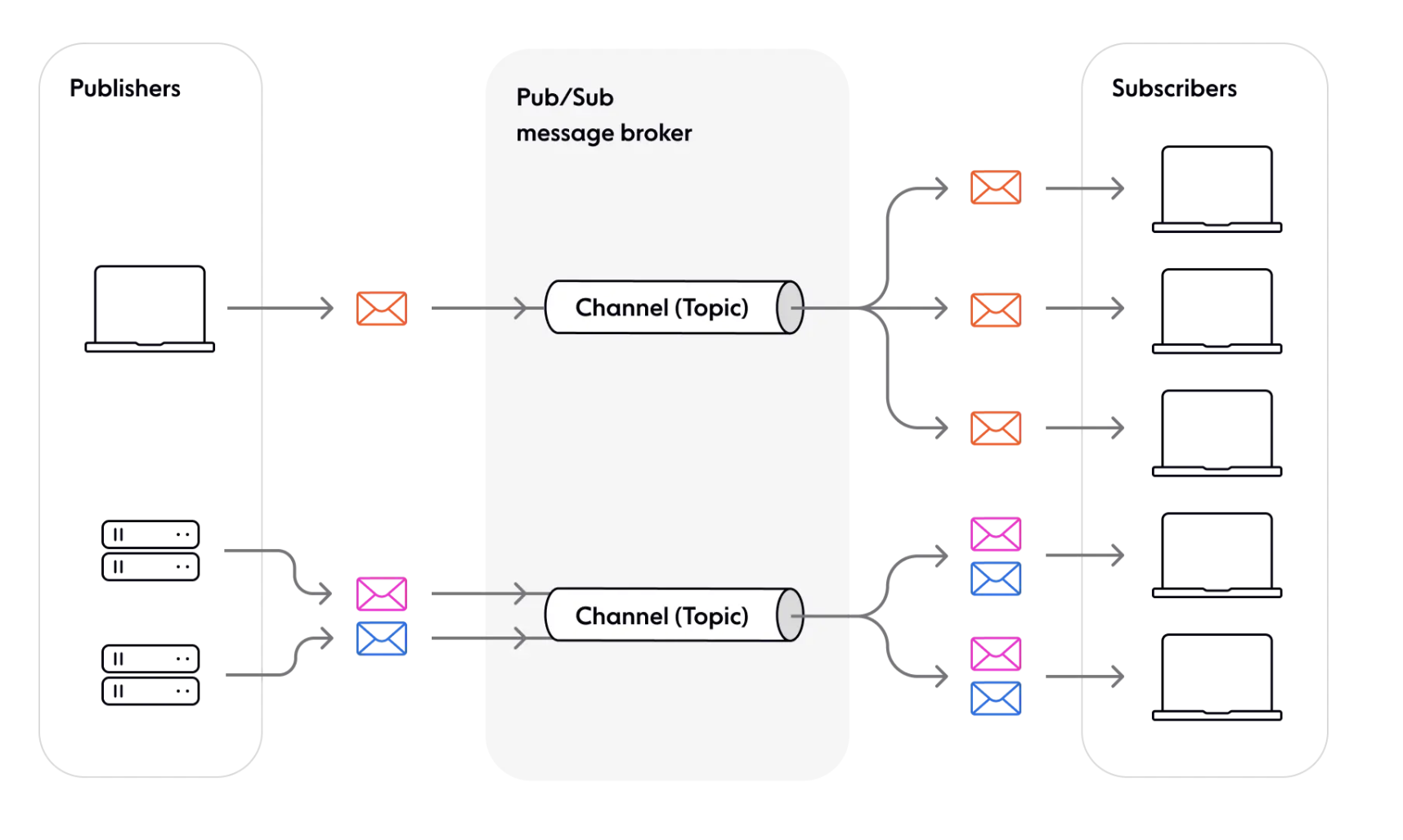
`redux` is following **Publish/Subscribe** design pattern. Where **store** is a channel from subscribing and publishing messages. The **dispatch** method is used to publish messages to the store. When an message is dispatched, the state of the application is changed. And **subscribe** method allows functions (subscribers) to subscribe to the store. These subscribers are notified when the state changes due to dispatched messages.
Here are some benefits of `Publish/Subscribe` Pattern:
- **Loose coupling between components**: the component that `publish` something doesn't need to who `subscribe` to the channel, making the system more modular and flexible.
- **High scalability** (in theory, Pub/Sub allows any number of publishers to communicate with any number of subscribers).
## Redux Implementation
> The following code is simplified, check the original code: [createStore.ts -- github](https://github.com/reduxjs/redux/blob/e124f0bf9b8a4a64389485b5c4506fc0798d7f3f/src/createStore.ts#L41)
As we can see, the core of `redux` is the function `createStore`, and the `dispatch`, `subscribe` methods of a store. We will skip other methods first and implement these functions.
We first define their interfaces:
```ts
interface Action {
type: string;
[extraProps: string]: any;
}
interface Reducer {
(state: T, action: Action): T;
}
// a store should have dispatch, subscribe methods
interface Store {
dispatch: (action: Action) => void; // setter
subscribe: (listener: () => void) => void;
getState: () => T; // getter
}
// accept a reducer and initial state, return a store object
function createStore(reducer: Reducer, initialState?: T): Store; // create
```
The first step, we implement the storage logic and the basic framework:
```ts
function createStore(reducer: Reducer, initialState?: T): Store {
// store reduce and state to local variable
let currentReducer = reducer;
let currentState: T | undefined = initialState;
// store listen(function that subscribe to this store) in a map id -> func
let currentListeners: Map | null = new Map();
// a id that will assign to the listener
let listenerIdCounter = 0;
function subscribe(listener: () => void) {
// store listener
const listenerId = listenerIdCounter++;
currentListeners.set(listenerId, listener);
}
function dispatch(action: Action) {}
function getState() {}
return {
dispatch,
subscribe,
getState,
}
}
```
And then we will start implement dispatch logic. When dispatch an action, the current state will change, and it will call all listeners subsequently.
```ts
function createStore(reducer: Reducer, initialState?: T): Store {
// store reduce and state to local variable
let currentReducer = reducer;
let currentState: T | undefined = initialState;
// store listen(function that subscribe to this store) in a map id -> func
let currentListeners: Map | null = new Map();
// a id that will assign to the listener
let listenerIdCounter = 0;
function subscribe(listener: () => void) {
// store listener
const listenerId = listenerIdCounter++;
currentListeners.set(listenerId, listener);
}
function dispatch(action: Action) {
// We will call reducer using action and current state, and update current state
currentState = currentReducer(currentState, action);
// Call all listener one by one after update the state
currentListeners.forEach(listener => {
listener();
});
}
function getState() {
return currentState;
}
return {
dispatch,
subscribe,
getState,
}
}
```
Now our toy redux is done. Notice that this is a simplified system without any error handling, if you take a look at redux's source code you shall see almost half of the code is handling error.
## Introduce React-Redux
So the front part of redux flow is done, we can now: dispatch an action -> store state update. But how to update the view? We need to introduce `react-redux`, React Redux provides a pair of custom React hooks that allow your React components to interact with the Redux store.
`useSelector` reads a value from the store state and subscribes to updates(getter) the view, while `useDispatch` returns the store's `dispatch` method to let you dispatch actions(setter). When `dispatch` something, the propagation happens and informs all components with `useSelector` to update their values.
```tsx
// store
ReactDOM.render(
,
document.getElementById('root')
);
export function Counter() {
// getter
const count = useSelector((state) => state.count)
// setter
const dispatch = useDispatch()
return (
{count}
{/* omit additional rendering output here */}
)
}
```
## Subscription(Propagation)
The core principle of `react-redux` is `propagation`. `propagation` represent the process that when there is a state changed, it will inform the root node about the change and the root node will carry the information to its children nodes, and thus the information is propagation through the whole tree.
We will create a Subscription interface, which contains:
```ts
export interface Subscription {
// add children subscription, thus a tree structure is formed
addNestedSub: (listener: VoidFunc) => VoidFunc
// propagate the information to its children nodes
notifyNestedSubs: VoidFunc
// check whether the node is subscribed
isSubscribed: () => boolean
// do something when the node is notified
handleChangeWrapper: VoidFunc
// this is for component to attach their function to this node so that handleChangeWrapper can call it
onStateChange?: VoidFunc | null
// try to subscribe to a store
trySubscribe: VoidFunc
// unsubscribe the node for garbage collection
tryUnsubscribe: VoidFunc
}
```
```ts
interface ListenerCollection {
notify: () => void;
subscribe: (callback: () => void) => void;
unsubscribe:
}[]
export function createSubscription(store: any, parentSub?: Subscription) {
// for store unsubscribe function
let unsubscribe: VoidFunc | undefined;
// for store the listeners
// for simplification we don't implement the listener methods here, we will do some wishful thinking and assume that we have a ListenerCollection class which is a link list that stores all the listeners(callback)
let listeners: ListenerCollection;
// Is this specific subscription subscribed (or only nested ones?)
let selfSubscribed = false;
function isSubscribed() {
return selfSubscribed;
}
function trySubscribe() {
// if it is a root node, subscribe its method to store
// else add to parent's listeners
if (!unsubscribe) {
unsubscribe = parentSub
? parentSub.addNestedSub(handleChangeWrapper)
: store.subscribe(handleChangeWrapper);
// create a empty link list of listener for preparing a space for its children nodes
listeners = createListenerCollection();
}
}
function tryUnsubscribe() {
if (unsubscribe) {
// call unsubscribe method, unsubscribe from store or parent listeners
unsubscribe();
unsubscribe = undefined;
// clear its listeners
listeners.clear();
listeners = null;
}
}
// for children nodes to add their listener to parent node
function addNestedSub(listener: () => void) {
const cleanupListener = listeners.subscribe(listener);
return () => {
// unsubscribe
tryUnsubscribe();
// clear its listeners
cleanupListener();
};
}
// force rerender
function handleChangeWrapper() {
subscription.onStateChange();
}
// propagate change
function notifyNestedSubs() {
listeners.notify()
}
const subscription: Subscription = {
addNestedSub,
notifyNestedSubs,
handleChangeWrapper,
isSubscribed,
trySubscribe,
tryUnsubscribe,
};
return subscription;
}
```
Now we have a way to create subscriptions that is associated with a certain `store`. The basic flow is:
1. Call `createSubscription` with `store` and call `trySubscribe` to get a `root` subscription, we can also assign a callback to `onStateChange`.
2. Call `createSubscription` with `store` and `root` to get a child subscription, when call `trySubscribe`, instead of binding the `onStateChange` to `store`, it will be added to `root` listeners list.
3. When `store` is changed, `onStateChange` of `root` will be called, and `root` will call `notifyNestedSubs` to notify children subscriptions, and the children subscriptions will do the same thing and notify their children subscriptions recursively. Thus, all nodes in the tree is informed. This process is called `propagation`.
## Provider
First of all, we need to store our state in somewhere, `react-redux` use `Context` to store.
Here is a simple `Context` example:
```jsx
const CounterContext = React.createContext('counter');
class App extends React.Component {
render() {
return (
);
}
}
```
And the components that are child node of Provider can access `CounterContext` via a `useContext`:
```jsx
const Counter = () => {
const counter = useContext(CounterContext);
return (
{counter}
);
}
```
We first take a look at how to implement `Provider`, which create and injects the `store` and a `subscription` to the children components.
```tsx
const ReactReduxContext = React.createContext(null);
function Provider({store, children}){
// provider will create a subscription when store with root is changed.
const contextValue = useMemo(() => {
const subscription = new Subscription(store);
subscription.onStateChange = subscription.notifyNestedSubs;
return {
store,
subscription,
};
}, [store]);
// get initial state
const previousState = useMemo(() => store.getState(), [store]);
// when previousState or contextValue change, try to subscribe again
useLayoutEffect(() => {
const { subscription } = contextValue
// subscribe to new store
subscription.trySubscribe()
// if the state is changed, notify listeners
if (previousState !== store.getState()) {
subscription.notifyNestedSubs()
}
return () => {
subscription.tryUnsubscribe()
subscription.onStateChange = null
}
}, [contextValue, previousState])
return (
// inject subscription and store to children nodes
{children}
);
}
```
## useSelector
Now we have a way to get `store` and root subscription in children components, we start implement a `useSelector` hook, which add a subscription to the subscription tree, and force component to re-render when state is changed.
Here we use `useReducer` for telling the component to `rerender`.
```jsx
function MyComponent() {
// when dispatch is call, the component will rerender
const [state, dispatch] = useReducer((s) => s + 1);
return // ...
}
```
Then we implement a simplified `useSelector` hook:
```tsx
// whenever the state in store is changed, update the state and inform a rerender.
// a selector callback for filter the state we want, equalityFn is for compare state change, here we use strictly equal ===
function useSelector(selector, equalityFn = (a, b) => a === b) {
// get store and root subscription from context
const { store, subscription: contextSub } = useContext(ReactReduxContext);
// utilize the forceRender function for rerender
const [, forceRender] = useReducer((s) => s + 1, 0);
// create a new subscription for the component that call this hook with root subscription
const subscription = useMemo(() => new Subscription(store, contextSub), [
store,
contextSub,
]);
// get current state when re-render
const storeState = store.getState();
// store selected state
let selectedState;
// cache selector, store state, selected state when every time render
const latestSelector = useRef();
const latestStoreState = useRef();
const latestSelectedState = useRef();
useLayoutEffect(() => {
latestSelector.current = selector;
latestStoreState.current = storeState;
latestSelectedState.current = selectedState;
});
// if the cache is needed to update
if (
selector !== latestSelector.current ||
storeState !== latestStoreState.current
) {
// calculate new selected state
const newSelectedState = selector(storeState);
// if new selected state is not equal to the previous state
if (
latestSelectedState.current === undefined ||
!equalityFn(newSelectedState, latestSelectedState.current)
) {
// update state
selectedState = newSelectedState
} else {
// use previous state
selectedState = latestSelectedState.current
}
} else {
// use previous state
selectedState = latestSelectedState.current
}
// attach checkForUpdates to the subscription's onStateChange
//Every time subscriptions are updated, checkForUpdates will be called
useLayoutEffect(() => {
// compare store state with current state
// if it is not equal, update current state
// force re-render the component
function checkForUpdates() {
try {
const newStoreState = store.getState();
const newSelectedState = latestSelector.current(newStoreState);
if (equalityFn(newSelectedState, latestSelectedState.current)) {
return;
}
latestSelectedState.current = newSelectedState;
latestStoreState.current = newStoreState;
} catch (err) {
}
// re-render anyway
forceRender();
}
// attach checkForUpdates to the subscription's onStateChange
subscription.onStateChange = checkForUpdates;
subscription.trySubscribe();
// call checkForUpdates for initialization
checkForUpdates();
return () => subscription.tryUnsubscribe();
}, [store, subscription]);
// return state we want
return selectedState;
}
```
### useReducer
As you can see we use `useReducer` here to trigger a state update and trigger a `render`. You might wonder why we don't use `useState` to do the same thing. The `useState` indeed can be used to force a re-render, but it requires writing extra code.
```tsx
// useReducer
const [, forceRender] = useReducer((s) => s + 1, 0);
// useState
const [, setState] = useState(0);
const forceRender = () => setState(prev => prev + 1);
```
## useDispatch
`useDispatch` is relatively simple, it get the `dispatch` function from the context:
```tsx
useDispatch() {
const { store } = useContext(ReactReduxContext);
return store.dispatch;
}
```
 Redux contains these several components:
- **Action**: A plain object describing what happened and the changes to be made to the state.
- **Dispatcher**: A function that takes an action object and sends it to the store to change the state.
- **Store**: The central repository that holds the state of the application. It allows access to the state, dispatching actions, and registering listeners.
- **View**: The user interface that displays the data provided by the store. It can trigger actions based on user interactions.
If some action on the application, for example pushing a button causes the need to change the state, the change is made with an action. This causes re-rendering of the view.
Let's take a look at the implementation of a counter:
Redux contains these several components:
- **Action**: A plain object describing what happened and the changes to be made to the state.
- **Dispatcher**: A function that takes an action object and sends it to the store to change the state.
- **Store**: The central repository that holds the state of the application. It allows access to the state, dispatching actions, and registering listeners.
- **View**: The user interface that displays the data provided by the store. It can trigger actions based on user interactions.
If some action on the application, for example pushing a button causes the need to change the state, the change is made with an action. This causes re-rendering of the view.
Let's take a look at the implementation of a counter:
 The impact of the `action` on the state of the application is defined using a `reducer`. In practice, a `reducer` is a function that is given the current state and an action as parameters. It returns to a new state.
Let's now define a `reducer` for our application:
```js
// the first state is the current state in store, and the function return
// a new state after action.
const counterReducer = (state, action) => {
if (action.type === 'INCREMENT') {
return state + 1;
} else if (action.type === 'DECREMENT') {
return state - 1;
} else if (action.type === 'ZERO') {
return 0;
}
return state;
}
```
And an `action` is like this:
```js
{
type: 'INCREMENT',
}
```
With the `reducer`, we can use `redux` to define a `store`.
```js
import { createStore } from 'redux';
// initial state is 0
const counterReducer = (state = 0, action) => {
// ...
};
const store = createStore(counterReducer);
```
A `store` has two core methods: `dispatch`, `subscribe`. A function can be `subscribe` to a store, and a `dispatch` takes an action and changes the state, when the state is changed, the functions that `subscribe` to the store will be called.
```js
const store = createStore(counterReducer);
console.log(store.getState());
store.dispatch({ type: 'INCREMENT' });
store.dispatch({ type: 'INCREMENT' });
store.dispatch({ type: 'INCREMENT' });
console.log(store.getState());
store.dispatch({ type: 'ZERO' });
store.dispatch({ type: 'DECREMENT' });
console.log(store.getState());
// console output
0
3
-1
```
## Publish/Subscribe Pattern
`redux` is following **Publish/Subscribe** design pattern. Where **store** is a channel from subscribing and publishing messages. The **dispatch** method is used to publish messages to the store. When an message is dispatched, the state of the application is changed. And **subscribe** method allows functions (subscribers) to subscribe to the store. These subscribers are notified when the state changes due to dispatched messages.
The impact of the `action` on the state of the application is defined using a `reducer`. In practice, a `reducer` is a function that is given the current state and an action as parameters. It returns to a new state.
Let's now define a `reducer` for our application:
```js
// the first state is the current state in store, and the function return
// a new state after action.
const counterReducer = (state, action) => {
if (action.type === 'INCREMENT') {
return state + 1;
} else if (action.type === 'DECREMENT') {
return state - 1;
} else if (action.type === 'ZERO') {
return 0;
}
return state;
}
```
And an `action` is like this:
```js
{
type: 'INCREMENT',
}
```
With the `reducer`, we can use `redux` to define a `store`.
```js
import { createStore } from 'redux';
// initial state is 0
const counterReducer = (state = 0, action) => {
// ...
};
const store = createStore(counterReducer);
```
A `store` has two core methods: `dispatch`, `subscribe`. A function can be `subscribe` to a store, and a `dispatch` takes an action and changes the state, when the state is changed, the functions that `subscribe` to the store will be called.
```js
const store = createStore(counterReducer);
console.log(store.getState());
store.dispatch({ type: 'INCREMENT' });
store.dispatch({ type: 'INCREMENT' });
store.dispatch({ type: 'INCREMENT' });
console.log(store.getState());
store.dispatch({ type: 'ZERO' });
store.dispatch({ type: 'DECREMENT' });
console.log(store.getState());
// console output
0
3
-1
```
## Publish/Subscribe Pattern
`redux` is following **Publish/Subscribe** design pattern. Where **store** is a channel from subscribing and publishing messages. The **dispatch** method is used to publish messages to the store. When an message is dispatched, the state of the application is changed. And **subscribe** method allows functions (subscribers) to subscribe to the store. These subscribers are notified when the state changes due to dispatched messages.
 Here are some benefits of `Publish/Subscribe` Pattern:
- **Loose coupling between components**: the component that `publish` something doesn't need to who `subscribe` to the channel, making the system more modular and flexible.
- **High scalability** (in theory, Pub/Sub allows any number of publishers to communicate with any number of subscribers).
## Redux Implementation
> The following code is simplified, check the original code: [createStore.ts -- github](https://github.com/reduxjs/redux/blob/e124f0bf9b8a4a64389485b5c4506fc0798d7f3f/src/createStore.ts#L41)
As we can see, the core of `redux` is the function `createStore`, and the `dispatch`, `subscribe` methods of a store. We will skip other methods first and implement these functions.
We first define their interfaces:
```ts
interface Action {
type: string;
[extraProps: string]: any;
}
interface Reducer
Here are some benefits of `Publish/Subscribe` Pattern:
- **Loose coupling between components**: the component that `publish` something doesn't need to who `subscribe` to the channel, making the system more modular and flexible.
- **High scalability** (in theory, Pub/Sub allows any number of publishers to communicate with any number of subscribers).
## Redux Implementation
> The following code is simplified, check the original code: [createStore.ts -- github](https://github.com/reduxjs/redux/blob/e124f0bf9b8a4a64389485b5c4506fc0798d7f3f/src/createStore.ts#L41)
As we can see, the core of `redux` is the function `createStore`, and the `dispatch`, `subscribe` methods of a store. We will skip other methods first and implement these functions.
We first define their interfaces:
```ts
interface Action {
type: string;
[extraProps: string]: any;
}
interface Reducer