Engineering Case study
Workspace v2 tab system: browser tabs inside a workspace
How we made workspace tabs keep state, survive refresh, share real URLs, and stop hidden runtimes from leaking side effects.
Workspace v2 needed tabs that behave more like browser tabs than a UI row. Users keep several business objects open, refresh and shared links still work, and hidden runtimes do not get to steal the URL, overlays, events, or foreground CPU. Most of the work was ownership: who owns intent, URL, tab state, runtime cache, sandbox effects, and the rendered frame.
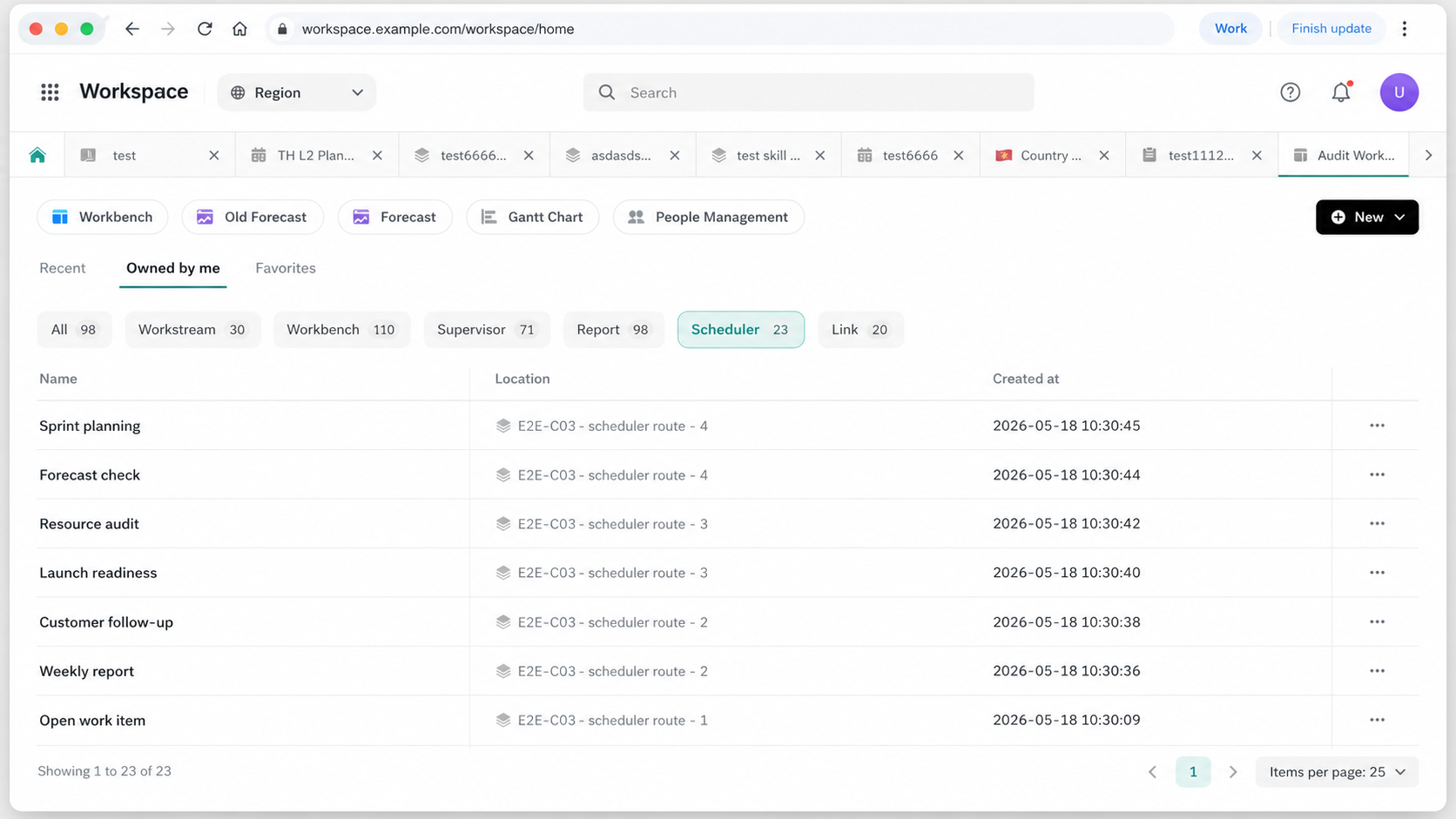
Background and goals
Workspace v2 changed the workbench from one page with one active context into a place where several workstreams, subapp views, and ticket objects can stay open at the same time. The user expectation is simple and unforgiving:
- several tasks stay open,
- switching back keeps state,
- refresh and shared links still land on the right business page,
- and a modal opened by one sub-application cannot cover another tab.
Business goals:
| Goal | User Experience |
|---|---|
| Multi-tasking | Users can keep multiple workstreams, subapps, and tickets open without repeatedly returning to the home page. |
| Context retention | Filters, scroll position, iframe state, and inner Workstream views should survive common tab switches. |
| Reliable links | Refresh, copied links, and external deep links should recover to a reasonable tab and business page. |
| Subapp integration without tab internals | Sub-applications express intent such as “open this page”; they do not need to understand the host tab implementation. |
| Browser-like responsiveness | Switching should be fast, and background tabs should not steal foreground CPU. |
Technical goals:
| User Expectation | Engineering Requirement | Failure If Missing |
|---|---|---|
| Multiple workstreams can stay open | Persist opened tabs, order, and pinned state | Refresh loses tabs, or different browser windows show different tab lists. |
| Switching back keeps state | Keep a bounded number of DOM / iframe runtimes warm | Every switch reloads the page; filters, scroll, and iframe state are lost. |
| URLs remain refreshable and shareable | Recover the target tab from the browser URL; write the business URL when a tab is activated | Copied links open as orphan pages, or the address bar points to the wrong tab. |
| Multiple windows work together | Synchronize tab-list mutations across windows | One window closes a tab while another still shows stale state. |
| Subapps can open pages | SDKs and event buses express intent; the host decides how to open | Tab behavior becomes scattered across subapps and bypasses capacity/reuse rules. |
| Hidden tabs do not affect the current tab | Scope history, DOM, overlays, events, and focus by tab | A hidden iframe changes the current URL, shows an overlay on another tab, or starts background work. |
| Switching feels responsive | Measure and schedule first load, hot switch, and background work separately | The page is visible but not clickable, while old metrics report a short duration. |
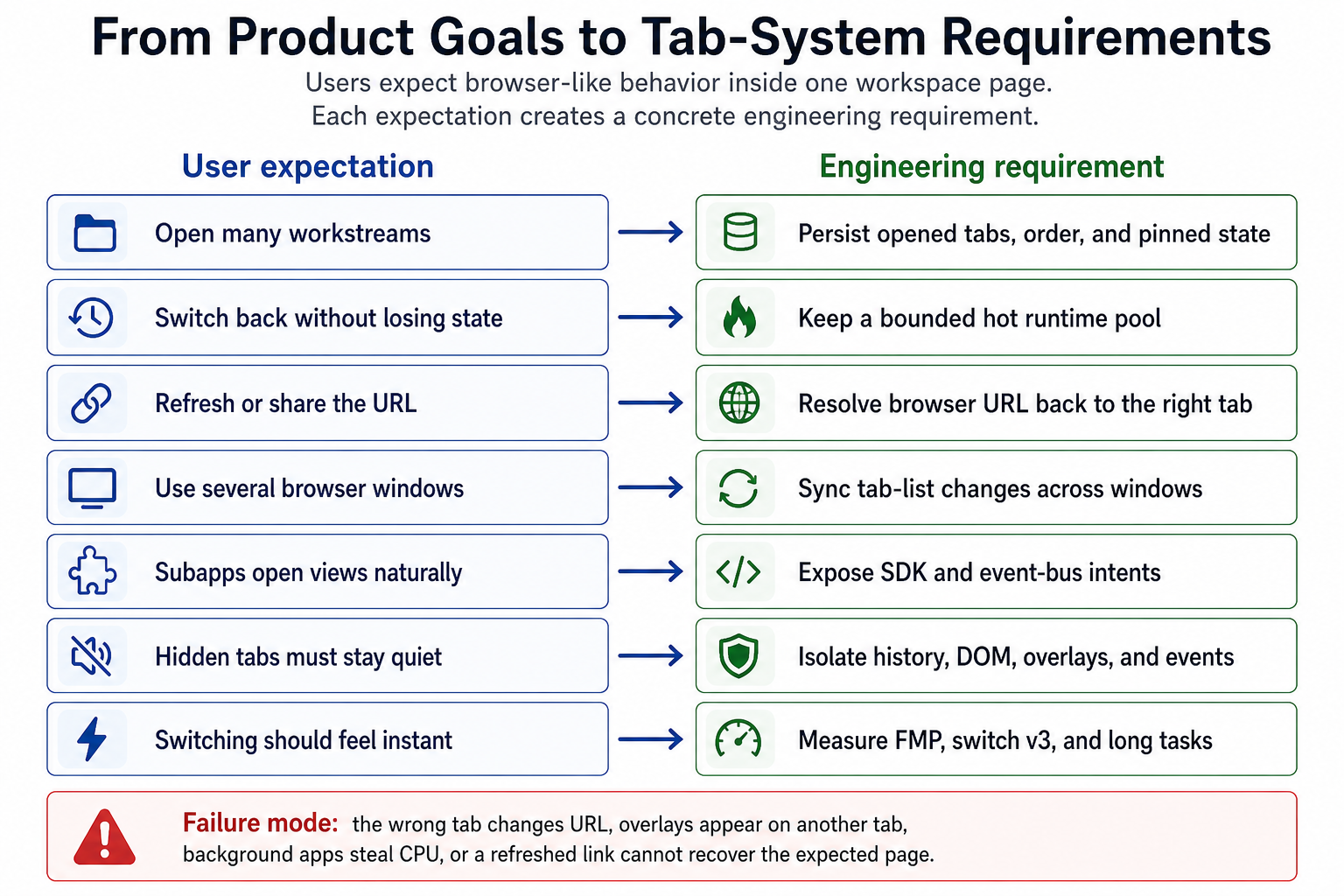
The final design principle is:
Keep the address bar as a real business URL; use server state to record which tabs are open; keep only a bounded working set warm; and put host-owned boundaries around subapp history, DOM, overlays, and events.
The system has two core questions:
- Should two entries reuse the same tab? For example, the same workstream should reuse one tab, while its internal view is preserved as URL/subPath state.
- Which tab owns runtime side effects now? Only the focused tab can write the browser URL, show overlays, receive foreground events, and consume foreground CPU.
Architecture layers
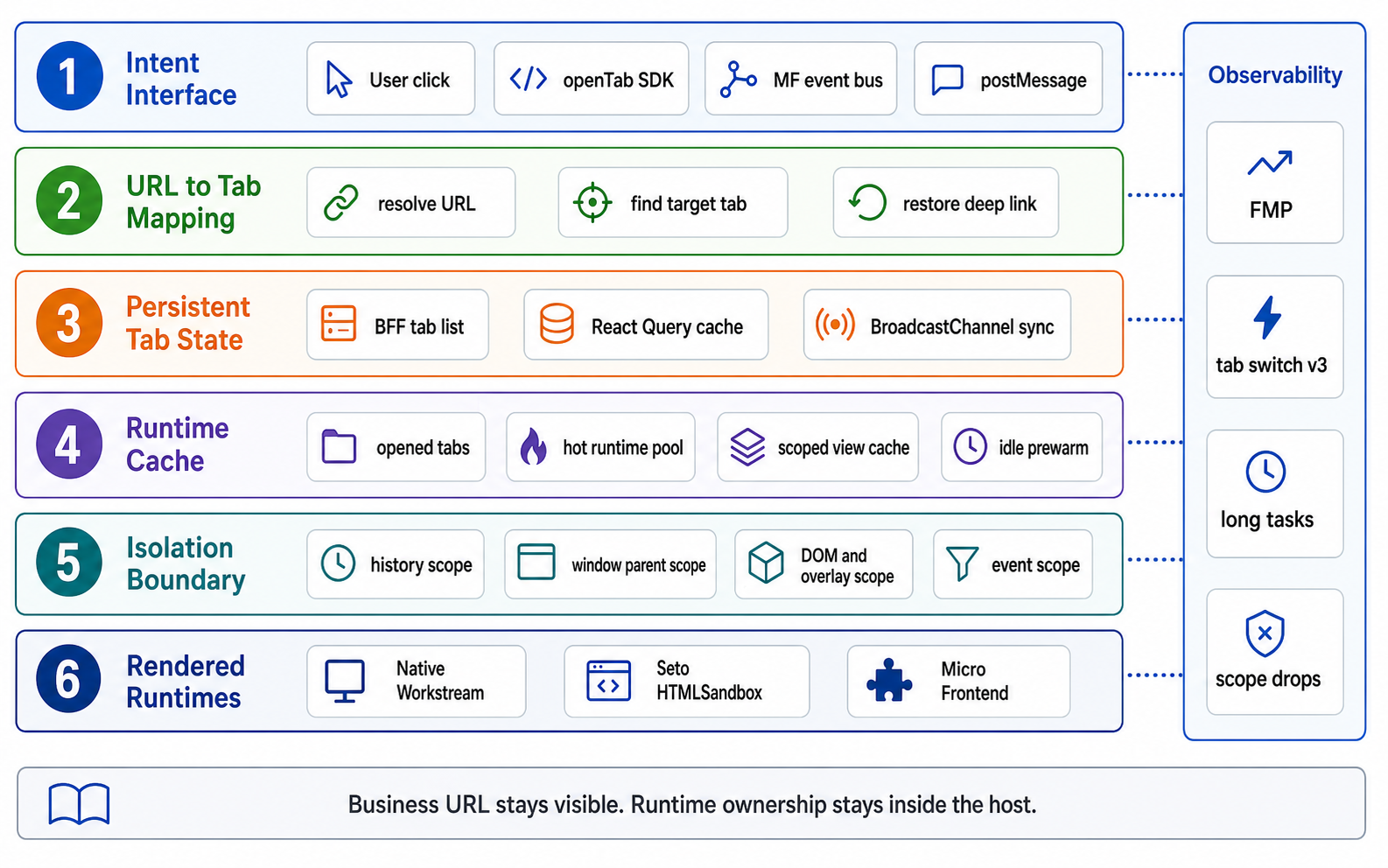
| Layer | Problem | Core Mechanism |
|---|---|---|
| Intent Interface | The same business object should not duplicate tabs or behave differently when opened from a menu, subapp button, SDK, iframe, or URL. | Normalize every entry into an open intent; the host decides new browser tab, absorb current tab, focus existing tab, or create a new tab. |
| URL And Tab Ownership | Refresh or shared links should recover to the same business page, not an internal orphan tab route. | Keep the address bar as a business URL; parse it into a tab input and match it against opened tabs. |
| Persistent Tab State | Refresh should not lose tabs; two browser windows should not split into different tab lists. | BFF stores opened tabs; React Query gives instant local UI; BroadcastChannel invalidates other windows after mutation. |
| Runtime Cache | Recent tabs should switch back quickly, but many opened tabs must not create unbounded memory or CPU pressure. | Separate opened tabs, hot runtime pool, and Workstream view cache. Evicting a runtime does not delete the tab. |
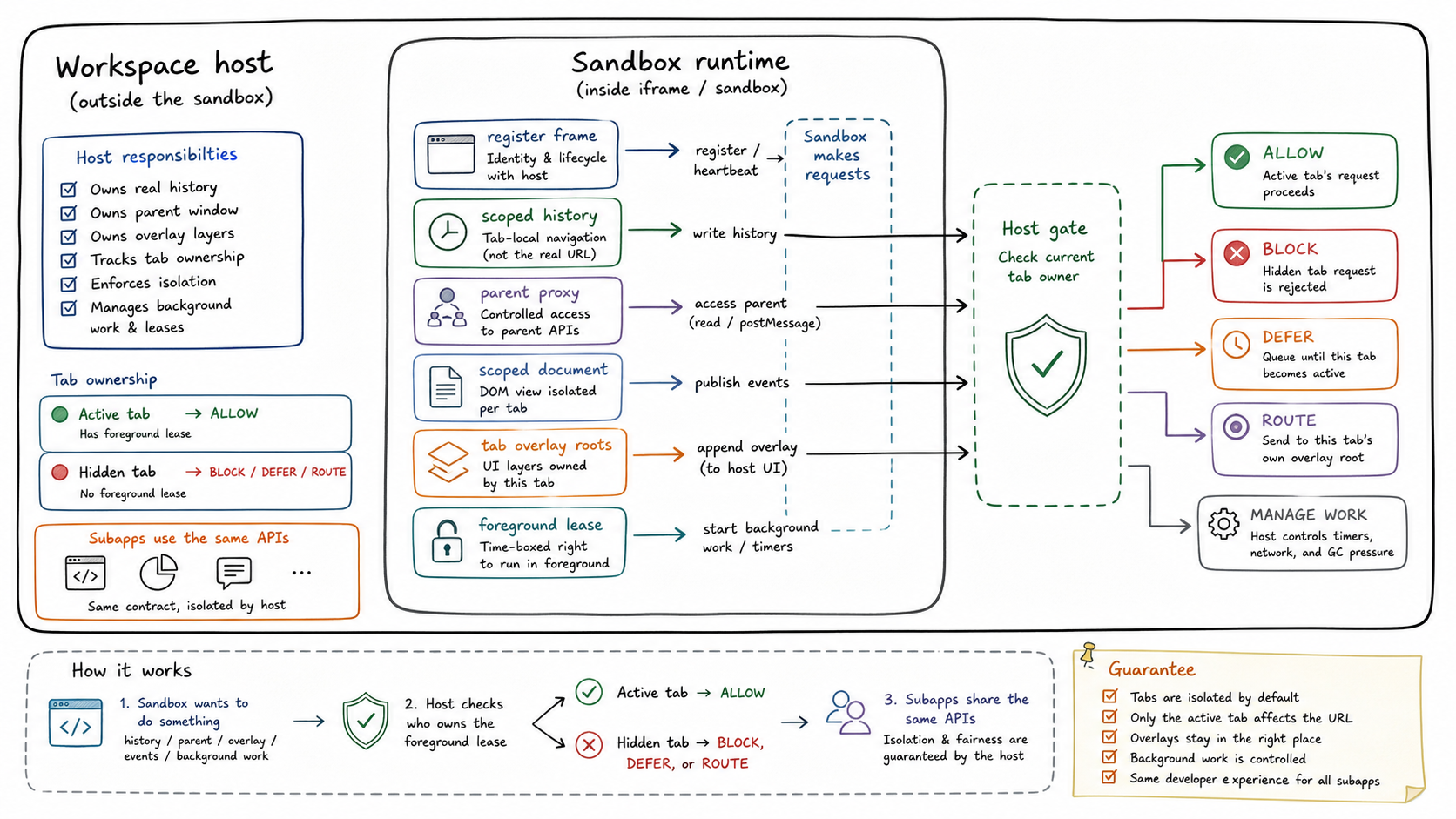
| Isolation Boundary | After switching to tab B, tab A must not change the URL, show overlays on B, receive foreground events, or start foreground work. | Scope history, window.parent, document/body, overlays, and focus events by current owner. |
| Rendered Runtimes | Users should see and interact with only the current tab. Clicks, overlays, and URL writes must belong to that tab. | Put every hot runtime into a stable frame; only the focused owner is visible, clickable, and allowed to receive foreground events. |
| Observability | When first load is slow, switching is janky, an overlay crosses tabs, or the URL is wrong, we need to know which layer failed. | FMP for first load, tab switch v3 for switching, long task/frame gap for visible jank, scope-drop logs for blocked writes, stress gates for regressions. |
Layer 1: Intent Interface
Problem
Users can open the same business object from many entry points: sidebar, tab row, a subapp button, MF event bus, iframe postMessage, or a copied business URL. The expected result is consistent: an already-open object is focused, a new object opens once, and a view inside the same subapp can often navigate within the current tab.
If each entry makes its own decision, users see direct failures: a menu click reuses a tab but a subapp button creates a duplicate; a shared link restores the page but SDK navigation loses the last inner view; one entry respects tab capacity while another bypasses it.
Solution
Subapps only express intent. The host decides how to execute it.
| Source | Input | Host Decision |
|---|---|---|
| User tab click | tab row id | Restore saved tab URL, activate runtime, write browser URL. |
| MF event bus | TAB_OPEN_REQUEST, NAVIGATE_TO_URL | Focus existing tab, absorb into current tab, create a tab, or open a new browser window. |
| iframe sandbox | window.postMessage envelope | Validate origin and payload, then convert to a host event bus request. |
| Subapp SDK | Passing Event Bus to Subapp through window object.Subapps have their own: openWorkstreamTab, openSubappViewTab, openSubApp | Normalize payload, find existing tab, create if needed. |
Simplified pseudocode:
// A subapp sends intent. It does not mutate host state.function openSubappView(viewType, viewId) {  emit('TAB_OPEN_REQUEST', { itemType: 'SUBAPP_VIEW', viewType, viewId });}
// A iframe post event to hostwindow.parent.postMessage({  type: 'MF_EVENT',  payload: {    type: 'TAB_OPEN_REQUEST',    data: {      itemType: 'WORKSTREAM',      workstreamId: 'from-iframe',    },    metadata: {      source: 'REPORT_CENTER',      timestamp: Date.now(),    },  },}, targetOrigin);
function handleTabOpenRequest(raw) {  const input = normalizeAndValidate(raw);
  if (raw.openInNewBrowserTab) {    window.open(buildBusinessUrl(input));    return;  }
  // existing: the target business object already owns a tab.  const existing = findExistingTab(tabs, input);
  // absorbing: the currently focused tab is a suitable carrier for this navigation.  const absorbing = findFocusedTabThatCanAbsorb(input);
  // If a subapp root can absorb but an exact tab already exists, prefer the exact tab.  if (existing && absorbing?.kind === 'subapp-root') {    focusTab(existing.id, savedUrlOrDefault(existing));    return;  }
  if (absorbing) {    navigateInsideTab(absorbing.id, buildPath(input));    return;  }
  if (existing) {    focusTab(existing.id, savedUrlOrDefault(existing));    return;  }
  addTabWithCapacityControl(input);}
Layer 2: URL And Tab Ownership
Problem
The browser has one address bar, while the workspace can keep multiple tab runtimes alive. We cannot replace business URLs with internal routes such as /tabs/:id.
| URL Shape | What Happens When Users Share It |
|---|---|
/tabs/abc123 | It only means “my local tab list has id=abc123.” Another user or another window does not know which workstream, ticket, or view it represents. |
/workspace/workstream/123/schedule/456 | The URL contains the business object. Refresh, bookmarks, IM sharing, and external deep links can recover the same business page. |
So the address bar stays as a real business URL:
/workspace/workstream/:id/.../workspace/scheduling/schedule/view/:viewId/workspace/audit_workbench/ticket/custom_view/:viewId
Internally, the host extracts business fields from the URL and uses them to decide whether two entries should reuse the same tab.
| Tab Type | Fields Used For Identity | Meaning |
|---|---|---|
| Workstream | workstreamId | Inner views are stored as path/subPath under one Workstream tab. |
| SubApp root | subAppType | The subapp root is a stable tab. |
| SubApp view | viewType + viewId | A concrete business view can become its own tab or be absorbed into the current subapp tab. |
| Ticket | ticketId + viewType | Ticket objects are suitable independent tabs. |
| Non-tab route | None | Home, notification, redirect, and unknown routes do not enter tab lifecycle. |
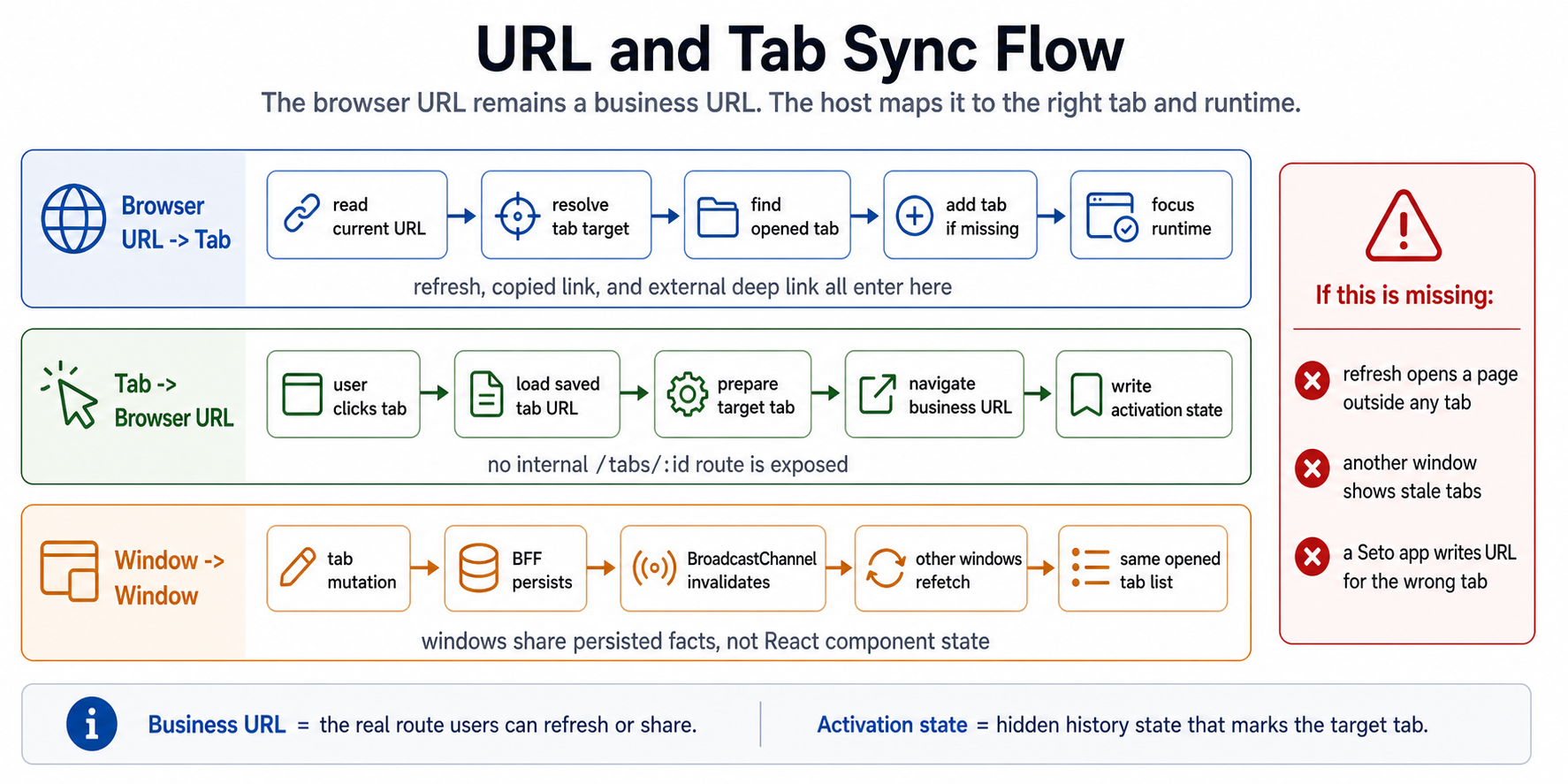
Browser URL -> Tab
This path handles refresh, copied links, and external deep links.
function onRouteChanged(location) {  // Parse the business URL into "does this route belong to a tab?"  const resolved = resolveTabFromUrl(location.pathname, appList);
  if (resolved.kind !== 'tab') {    // Home, redirect, or fallback pages render normally.    // They do not create tab rows or hot runtime entries.    renderSingleOutlet();    return;  }
  const matched = findOpenedTab(tabs, resolved.input);  if (matched) {    focusRuntime(matched.id);    return;  }
  // Direct URL recovery:  // The user opened a valid business URL, but BFF has no opened tab yet.  addTab(toAddWorkspaceTabRequest(resolved.input));  focusRuntimeWhenReady(resolved.input);}
Tab -> Browser URL
This path handles tab clicks.
function activateTab(tab) {  // Restore the tab's last business URL, not an internal /tabs/:id URL.  const path = loadSavedTabUrl(tab.id) ?? buildDefaultBusinessUrl(tab);
  startTabSwitchMetric({ toId: tab.id, targetPath: path });
  // The next history write belongs to this target tab.  // Some subapps and the iframe sandbox will keep syncing URL in background  // using RAW_HISTORY.replaceState  // We must tell history handler which tab is focusing and actions should be accepted  // otherwise might causing racing condition and url got changed to other things  prepareScopedNavigation({ targetTabId: tab.id, url: path });
  navigate(path, {    state: { workspaceTargetTabId: tab.id },    flushSync: true,  });}
Window -> Window
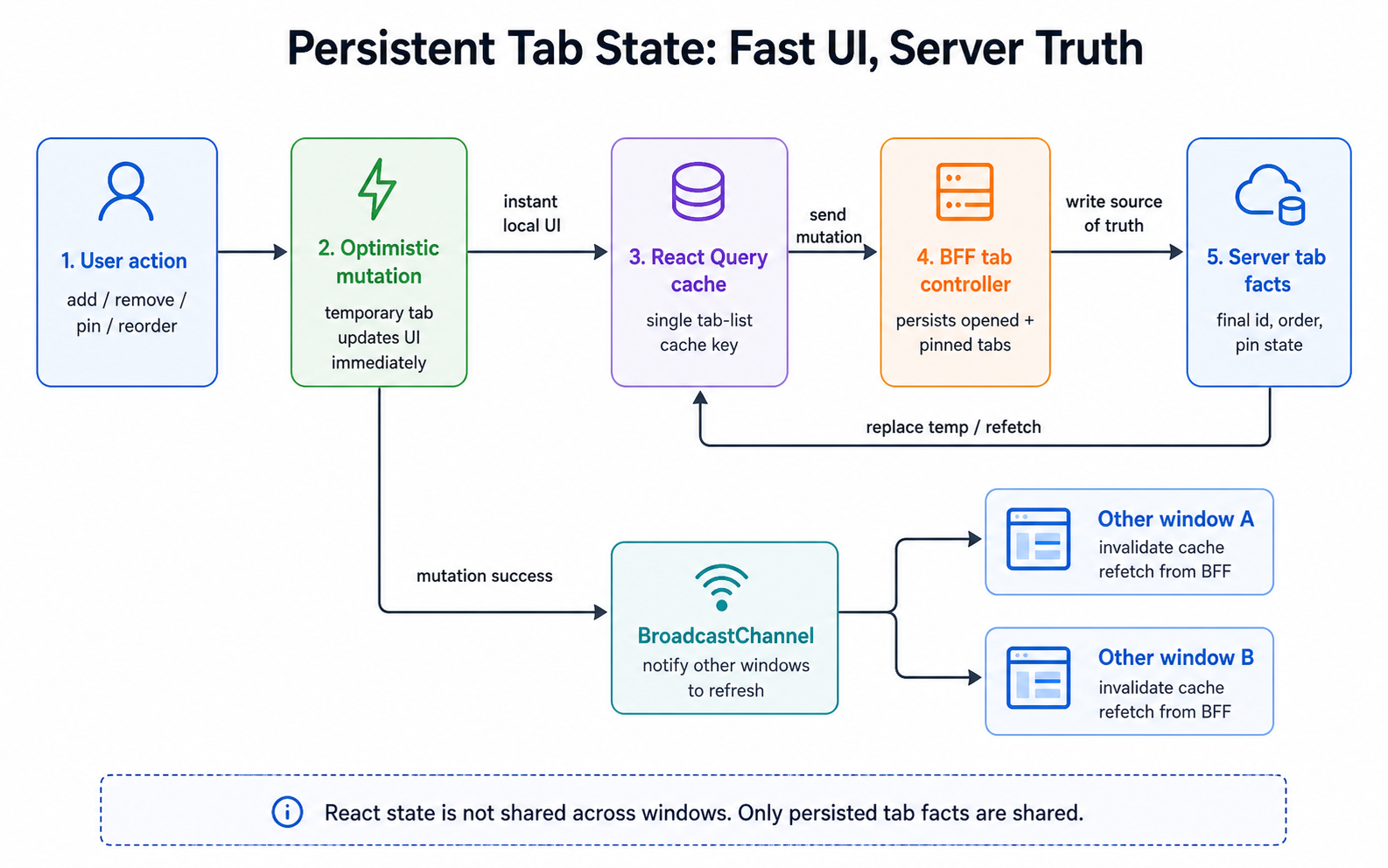
Tab list mutations are persistent facts, not local React state.
async function mutateTabs(mutation) {  // Current window updates optimistically for fast feedback.  queryClient.setQueryData(tabListKey, applyOptimistic(mutation));
  await bff.mutateTabs(mutation);
  // Other windows do not receive the full state through BroadcastChannel.  // They only get invalidation and refetch from BFF.  broadcastChannel.postMessage({ type: 'TAB_LIST_INVALIDATED' });}
Layer 3: Persistent Tab State
Problem
Users see three concrete failures if tab state is only local: refresh loses the tab row, add/remove/pin feels delayed if every mutation waits for the server, and two browser windows drift apart after one window mutates the tab list.
Backend told me the Tab actions and list would be relatively slow because it involved a lot of services.
Solution
Persistent state is handled by BFF plus React Query.
| Module | Responsibility |
|---|---|
| BFF tab controller | list/add/remove/pin/unpin/reorder, plus merging opened tabs and pinned tabs. |
| React Query | Single tab-list cache key, stale-time policy, focus refetch. |
| Optimistic mutation | Insert a temporary tab before server response; replace it when BFF returns the final tab. The temporary tab will be locked from actions like pin/unpin/delete before we can get its real id. |
| BroadcastChannel | After mutation succeeds, tell other windows to invalidate and refetch. |
Simplified flow:
function useAddTab() {  return useMutation({    mutationFn: bff.addTab,
    onMutate(input) {      // Current window becomes fast immediately.      addOptimisticTab(input);    },
    onSuccess(serverTab) {      // Server id and order are the final facts.      replaceOptimisticTab(serverTab);      broadcast('TAB_LIST_INVALIDATED');    },  });}
Layer 4: Runtime Cache
Problem
Users expect recently used tabs to switch back quickly, with scroll, form, and iframe state intact. But if every opened tab keeps a live runtime, the current tab slows down and memory grows without a bound.
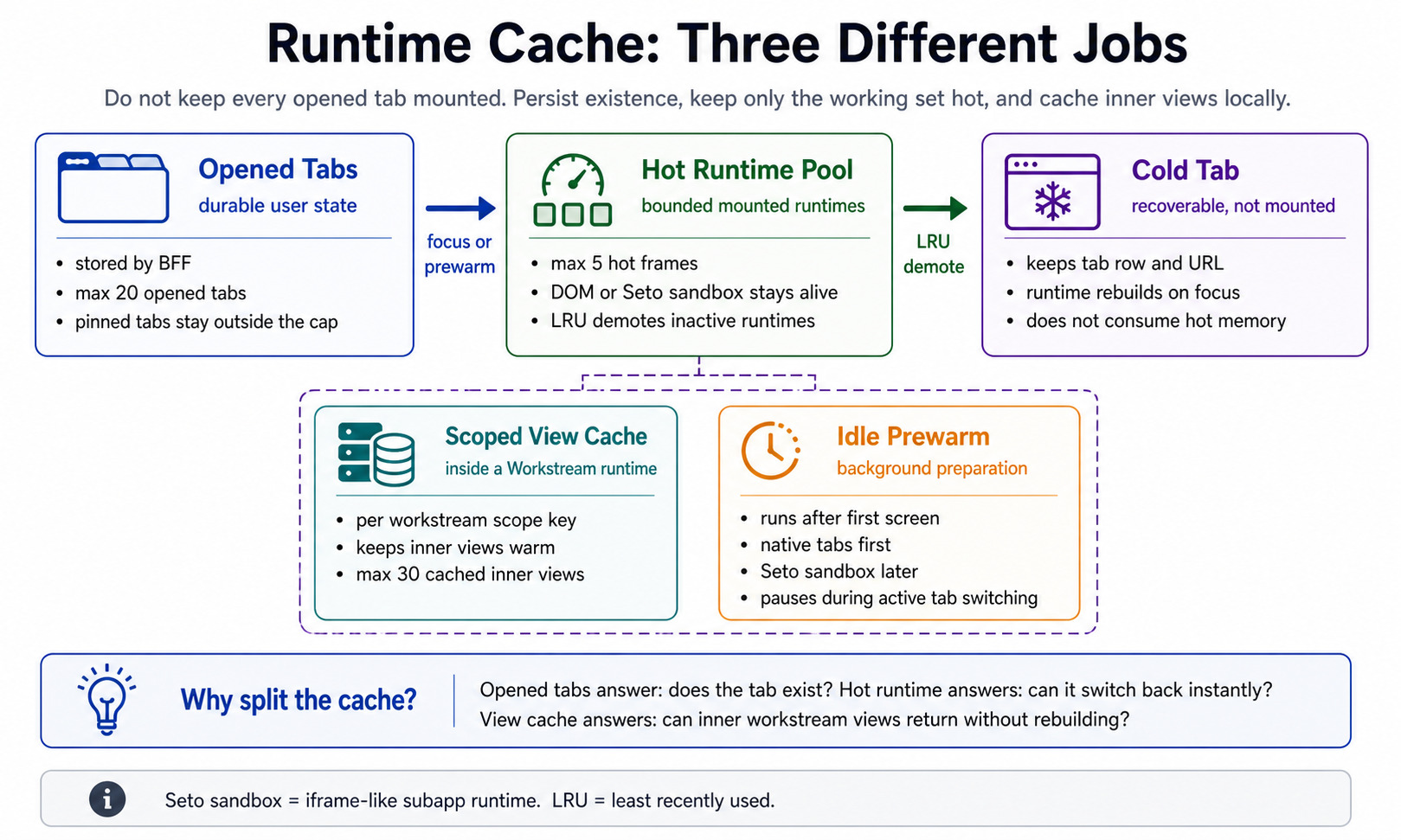
The key is to separate three concepts that look similar in UI but have different lifecycles.
| Layer | Question It Answers | Lifecycle |
|---|---|---|
| Opened tabs | Which tabs should appear in the tab row? | Persisted by BFF. Evicting runtime does not delete the tab. |
| Hot runtime pool | Which runtimes are alive now? | Bounded LRU/working set. Hidden runtimes are warm but not foreground. |
| Scoped view cache | Can an inner Workstream view return quickly? | Cached by Workstream scopeKey; capped inner views. |
Hot-pool update:
function onTabActivated(tabId) {  warmPool.touch(tabId);
  for (const evicted of warmPool.evictOverflow()) {    // Evicting runtime only frees DOM / iframe / JS resources.    // It does not delete the opened tab from BFF.    disposeRuntime(evicted.tabId);  }}
Idle prewarm:
afterFirstScreenReady(() => {  requestIdleCallback(() => {    for (const candidate of selectIdlePrewarmTabs({ tabs, focusedTabId, hotTabs })) {      if (foregroundTabIsSettling()) break;      prewarmRuntime(candidate);    }  });});
function selectIdlePrewarmTabs({ tabs, focusedTabId, hotTabs }) {  if (!focusedTabId) return [];
  const hotIds = new Set(hotTabs.map(tab => tab.id));  const recentIds = loadRecentHotTabIds(agentId); // get from localstorage  // users last time opened tabs
  sortRecentTabsBeforeOtherTabs(recentIds); // prioritize recent tabs than normal tabs for prewarming
  return tabs    .filter(tab => tab.id !== focusedTabId) // not current tab    .filter(tab => !hotIds.has(tab.id))     // not tabs in warm pool    .filter(tab => tab.isLocked !== true)   // not locked tab    .slice(0, 2);                           // 2 tabs at one time}
// 1. idle queue select candidatecandidate = {  id: tab.id,  location: `tab's URL`,  runtimeKind: native / subapp / sandbox,};
// 2. Put in WarmPoolwarmPool.promote(candidate);
// 3. WarmPool notifies ReactuseWarmPool(pool) subscribe snapshot through useSyncExternalStore;
// 4. WorkspaceContentHost rerender hotTabshotTabs.map(tab => <HotTabFrame tab={tab} isFocused={...} />);
// 5. HotTabFrame mount runtime<WorkstreamTabRoutes  location={tab.location}  tabId={tab.id}  runtimeTabInitialLocation={tab.location}/>
Layer 5: Isolation Boundary
Problem
After the user switches to tab B, a subapp inside tab A can still be alive in the background. If we only hide the DOM, users can still see these failures:
| Problem | Cause |
|---|---|
| The current address bar suddenly changes to another tab’s URL. | A hidden iframe can still call history.pushState / replaceState. |
| Browser back wakes up a route inside a non-current tab. | Multiple iframes can observe the same popstate / hashchange. |
| A modal or toast from tab A covers tab B; dropdown positioning drifts. | Component libraries append overlays to the global document.body. |
| A background tab thinks it is focused and starts fetching or running heavy work. | Lifecycle events are broadcast globally instead of filtered by tab id. |
Sandbox Integration
| Category | Problem | Cause / Sandbox Constraint | Boundary Needed |
|---|---|---|---|
| Hidden tab updates the visible browser URL. | Sandbox runtimes can still call window.history or the sandbox’s RAW_HISTORY while kept alive in the warm pool. | Add a host tab-ownership context around the sandbox runtime. | |
A subapp bypasses the sandbox through window.parent. | Some subapps or SDKs call window.parent.history, window.parent.document. | Return a tab-scoped parent proxy: parent history delegates to scoped history, parent document resolves to the tab document scope. | |
| The first sandbox route write is missed, or early patching breaks sandbox startup. | The raw sandbox window is only reliable after the sandbox framework reports ready; patching too late misses the first route replace. | Register the runtime frame in onSandboxReady(), then reset the initial URL and install tab-scoped patches. | |
| Switching back shows another tab’s content, scroll state, or mounted DOM. | If sandbox content mounts into one global container, multiple hot tabs share the same DOM owner. | getContainer() must return the current HotTabFrame root, so each tab owns a stable DOM subtree. | |
| Modal or toast from hidden tab appears over the active tab. | Component libraries append Modal/Dropdown/Toast to global document.body. | Route body append and portal operations to a tab-owned overlay root. | |
| Dropdown or tooltip is contained but positioned incorrectly. | Floating overlays depend on trigger coordinates and viewport context; simply moving them into a modal root can break placement. | Separate content overlays from floating overlays; keep floating placement tied to the trigger’s tab coordinate system. | |
| Background runtime consumes CPU during active tab switch. | Hidden runtimes can continue timers, lifecycle prime, prewarm, or refresh work while the foreground tab is settling. | Use a foreground lease and background scheduler; defer background work until the active tab is stable. | |
| Hidden tab sends event to event bus and opens the wrong tab through SDK calls. | SDK and MF event bus calls express user intent, but the host must decide which tab owns that intent. | Normalize SDK / postMessage / MF event bus calls into tab-scoped host commands. |
Sandbox capabilities used:
| Sandbox Capability | Requirement | Integration |
|---|---|---|
Sandbox | Reuse the framework’s loading, entry, basename, and lifecycle. | The host wraps tab owner around the sandbox runtime; it does not rebuild the runtime. |
getContainer() | Mount DOM into the current tab, not the global page. | Return the root inside HotTabFrame; re-register DOM scope when root changes. |
onSandboxReady(sandbox) | Access a patchable sandbox window. | Use sandbox.raw.win to register runtime frame and patch history/parent/event. |
BaseSandbox | Know which sandbox is calling document/body APIs. | Use WeakMap to associate sandbox with its tab root. |
DocExternals / document plugin context | Scope document.body, queries, and append operations. | Restrict queries to scoped root; route body portals to tab overlay root. |
sandbox.raw.win.RAW_HISTORY | Patch the history the sandbox actually uses. | Validate pushState / replaceState target before syncing host history. |
Integration order:
function SandboxTabRuntime({ tabId, entry, initialUrl }) {  const root = getCurrentHotTabRoot(tabId);  let sandboxRef = null;
  return (    <Sandbox      entry={entry}      url={initialUrl}
      // DOM must mount into this tab's frame, not a global container.      getContainer={() => root}
      onSandboxReady={(sandbox) => {        sandboxRef = sandbox;
        registerRuntimeFrame({          tabId,          window: sandbox.raw.win,          rawHistory: sandbox.raw.win.RAW_HISTORY,        });
        installScopedHistory(tabId, sandbox.raw.win);        installScopedParentProxy(tabId, sandbox.raw.win);        installScopedEventBridge(tabId, sandbox.raw.win);      }}    />  );}
History / Window Scope
The sandbox architecture has a lot of history:
| History | Belongs to | Usage | Risk |
|---|---|---|---|
| window.history | Workspace main app | It will change the url directly | NA |
| iframeWin.history | iframe sandbox sub app history | Sub app code call window.history | By default it doesn’t know whether workspace tab is active or not |
| iframeWin.RAW_HISTORY | Sandbox history plugin maintained history | The sandbox uses it to simulate/sync its internal router | If we don’t inspect, sandbox-internal replace/push will ignore tab status |
| scopedHistory | The history that we created for scoping tab’s history | It will check whether tab is activated and then decide whether raw history / host history | The isolation layer we added |
| window.parent.history | Subapp can escape and visit parent history by this | Some of the subapps call parent history directly | tab can write URL directlywindow.parent.history.pushState(...)window.parent.location.href = ... |
function scopedPushState(state, unused, url) {  const target = getNavigationTargetFromStateOrPreparedScope(state, url);
  if (target.tabId !== currentRuntime.tabId) {    recordScopeDrop({      reason: 'history-write-to-wrong-tab',      from: currentRuntime.tabId,      to: target.tabId,      url,    });    return;  }
  rawHistory.pushState({ ...state, workspaceTargetTabId: target.tabId }, unused, url);}
// sandbox internal raw historyframe.rawHistory.pushState = frame.patchedPushState;frame.rawHistory.replaceState = frame.patchedReplaceState;
// the sandbox iframe exposes this to subapps as window.historyObject.defineProperty(frame.iframeWin, 'history', {  get() {    return frame.scopedHistory;  },});
window.parent is also a Proxy, not the raw host window:
parentProxy.get('history') -> scopedHistoryparentProxy.get('document') -> scopedDocumentFacadeparentProxy.get('__workspaceMFEventBus__') -> scopedEventBusSubapps still use the same interface shape, but every capability they receive is already scoped by tab.
Event Scope
Only receive event from active tab.
function publishTabLifecycle(type, targetTabId) { for (const runtime of runtimeRegistry.all()) { if (runtime.tabId !== targetTabId) continue; runtime.eventBus.emit(type, { tabId: targetTabId }); }}DOM / Overlay Scope
The user-facing issue is simple: a popup or dropdown looks like UI of the current tab, but many libraries append it to global document.body. If the host does not intercept that, hidden tab overlays can cover the current tab or dropdowns can drift because their coordinate system changed.
Overlay types are different:
- Select, Dropdown, and Tooltip are floating overlays and need trigger-relative positioning.
- Modal, Drawer, Toast, and Notification are content overlays and should be constrained to the tab content area.
- Large-overlay geometry heuristics should only apply to
position: fixed, otherwise absolute dropdowns drift.
Step 1: make document APIs resolve inside the tab
When code inside the sandbox calls:
document.bodydocument.querySelector(...)document.getElementsByClassName(...)we do not let it see the host’s global document by default. We resolve the current sandbox first, find its registered tab root, and answer from that root.
docUse('body', ctx => {  return scopedRoot(ctx) ?? realDocument.body;});
docUse('querySelector', ctx => {  const root = scopedRoot(ctx);  if (!root) return realDocument.querySelector(...ctx.args);
  return root.querySelector(...ctx.args);});
Step 2: create two overlay roots for each tab
For every registered tab root, we create:
HotTabFrame(tab A)  └── sandbox app content root
workspace-overlay-root └── workspace-subapp-overlay-root[data-tab-id="tab A"] └── workspace-subapp-content-overlay-root| Root | Used for |
|---|---|
| workspace-subapp-overlay-root | floating overlays: dropdown, tooltip, popover, listbox |
| workspace-subapp-content-overlay-root | modal-like content: dialog, drawer, toast, large blocking overlays |
This split matters. A Modal should be contained with the tab, but a Dropdown often depends on trigger coordinates. If we force every overlay into the same content root, dropdowns can drift.
Step 3: intercept append and route the node
When a library does something like:
document.body.appendChild(node);or the sandbox runtime inserts body children into the scoped root, we classify the node before keeping it there.
function routeRuntimeBodyNode(node, tabRoot) {  if (!isElement(node)) return;
  const target = chooseOverlayTarget(node);
  if (target) {    target.appendChild(node);    return;  }
  rawAppendChild(tabRoot, node);}
function chooseOverlayTarget(node) {  // Dropdown / tooltip / popover / listbox must stay on the floating plane.  if (hasFloatingDescendant(node) || isPositionedOverlay(node)) {    return tabOverlayRoot;  }
  // Modal / drawer / toast / large blocking UI goes to content overlay root.  if (hasDialogDescendant(node) || isLargeOverlay(node)) {    return tabContentOverlayRoot;  }
  // Normal app DOM remains in the tab content root.  return null;}
Step 4: hide overlay roots that do not belong to the focused tab
Warm pool keeps hidden tabs mounted, so their overlay roots may still exist. On focus change, Workspace updates the visible overlay owner:
useLayoutEffect(() => { setFocusedWorkspaceOverlayTab(effectiveFocusedTabId);}, [effectiveFocusedTabId]);Then overlay roots are toggled by tab id:
function updateSubappOverlayFocus(root) {  const tabId = root.getAttribute('data-workspace-overlay-tab-id');  const visible = tabId === focusedWorkspaceOverlayTabId;
  root.style.display = visible ? '' : 'none';  root.style.visibility = visible ? 'visible' : 'hidden';  root.style.pointerEvents = 'none';}
Foreground Leasing
We must protect and prioritize activated tab tasks and postpone other background tabs tasks so that the performance during switching won’t be laggy.
// trigger: when user focus on a tabbeginWorkspaceForegroundTabTask({  tabId: targetTabId,  reason: 'tab_activation',});
function beginWorkspaceForegroundTabTask({ tabId, reason }) {  foregroundLease = {    tabId,    reason,    expiresAt: Date.now() + WORKSPACE_FOREGROUND_TASK_LEASE_MS,  };}
// before other tabs' tasks execute, tasks like: prewarm、lifecycle prime will trigger
if (shouldDeferWorkspaceBackgroundTask({ tabId: candidate.id })) {  scheduleNext(1000);  return;}
function shouldDeferWorkspaceBackgroundTask({ tabId }) {  const lease = activeForegroundLease();
  // it is not under protect period  if (!lease) return false;
  // null represent it is the protect period  if (lease.tabId === null) return true;
  // only execute focused tab's tasks, others postpone.  return tabId !== lease.tabId;}
Layer 6: Rendered Runtimes
Problem
The user sees one current tab, but the host may keep native Workstream, iframe sandbox, and MF subapp runtimes alive. If these runtimes are treated as ordinary React components, users see direct failures:
| Problem | Cause |
|---|---|
| After switching from tab A to B, A’s DOM or iframe still blocks the page or receives clicks. | Hot runtime is kept alive but not removed from the interactive layer. |
| B is visible, but a click, overlay, or URL write still applies to A. | Visual focus and runtime owner are not synchronized. |
| A background tab re-renders because the current URL changed. | Every retained runtime reads the same global location instead of per-tab location. |
| Some pages keep state while others remount. | Native routes, iframe sandbox, and MF iframe have different lifecycle models. |
| Metrics say “switch complete”, but the visible page cannot be clicked. | Mounted, visible, and interactive are different phases. |
Solution
Every hot tab gets a stable frame. The frame is not decoration; it normalizes different runtimes into host semantics.
| Step | What is set | Where it is used |
|---|---|---|
| Sandbox runtime focus | focusedRuntimeTabId | Scoped history checks whether a sandbox history write may update the host URL. |
| Overlay focus | focusedWorkspaceOverlayTabId | Tab-owned overlay roots are shown or hidden by data-workspace-overlay-tab-id. |
| Warm runtime | WarmPool entry and LRU timestamp | WorkspaceContentHost renders or reuses the matching HotTabFrame. |
| Lifecycle event | TAB_BLURRED / TAB_FOCUSED with tabId | Subapps, MF components, and SDK listeners filter lifecycle events by tab id. |
| Switch metric | visible timestamp for nextTabId | Tab switch metrics distinguish shell activation from real frame visibility. |
Switching becomes an ownership update:
function commitFocusedTab(nextTabId) {  // 1. URL owner for sandbox runtimes.  // This records which tab is currently allowed to mirror sandbox history  // writes into the real browser address bar.  setFocusedSandboxRuntimeTab(nextTabId);
  // 2. Overlay owner.  // Each tab-owned overlay root carries data-workspace-overlay-tab-id.  // This shows only the overlay root for the focused tab and hides overlays  // that still exist in hidden warm-pool tabs.  setFocusedWorkspaceOverlayTab(nextTabId);
  // 3. Runtime owner.  // Promote the focused tab into the warm pool. If it is already hot, refresh  // its LRU position; if it is cold, create a HotTabFrame for it.  warmPool.promote(nextTabId, currentLocation, runtimeKind);
  // 4. Lifecycle owner.  // Emit TAB_BLURRED for the previous tab and TAB_FOCUSED for the next tab.  // The payload carries tabId, so subapps and SDK listeners can ignore events  // that do not belong to their own tab.  publishTabLifecycleTransition(prevTabId, nextTabId);
  // 5. Metric owner.  // Once the focused HotTabFrame is actually visible on the next animation  // frame, mark tab-switch-visible. This separates “shell selected a tab”  // from “the target tab is visible to the user”.  notifyTabSwitchFrameVisible(nextTabId);}
Key tradeoffs
| Tradeoff | Why Not The Simpler Option | Final Choice |
|---|---|---|
| URL | Internal routes such as /tabs/:id are simple, but the link only means something inside one user’s local tab session. | Keep real business URLs and let the host resolve them into tab ownership. |
| Cache | Keeping every runtime alive makes switching fast, but memory and CPU grow without a bound. | Separate opened tabs from hot runtimes; opened tabs are durable, hot runtime pool is capped. |
| Sandbox | Reloading on every switch is clean, but it loses state and makes switching slow. | Keep the sandbox runtime warm, then scope host-facing APIs. |
| Interface | Letting every subapp understand tabs reduces host code at first, but spreads coupling everywhere. | Subapps only send intent; the host owns reuse, absorb, focus, creation, and capacity. |
| Observability | A single duration metric is easy, but it hides post-visible jank and cross-tab side effects. | Split first load, hot switch, long task, scope drop, and stress gates. |
The tab row is the easy part. The harder part is the ownership model: which runtime may write the URL, which tab owns DOM and overlays, which listeners receive foreground events, and which work may use foreground CPU. Once those rules are explicit, the workspace starts behaving like tabs instead of hidden pages stepping on each other.