🌑

从零构建 Redux(Redux 源码解读)

Read in English

状态不过是一个 getter/setter。

本文你将学到什么

  1. Redux 与 React-Redux 的设计与实现:本文深入探讨 Redux 和 React-Redux 的设计与实现,展示它们如何管理应用状态并促进组件间的通信。
  2. 状态管理(Getter、Setter):你将理解状态管理的基本模式,并能够理解其他任何状态管理工具。
  3. 发布/订阅设计模式:本文解释了发布/订阅模式,这是 Redux 状态更新和通知机制的核心概念。

什么是 Redux?

Redux 是一个面向 JavaScript 应用的可预测状态容器。它就像一个功能更强大的 React 状态。React 的状态仅限于各个组件,而 Redux 允许你在一个地方管理整个应用的状态。

Redux 通过将整个应用的状态存储在单一 store 中的一个 JavaScript 对象来解决这个问题。这使得随时间追踪变化、调试,乃至将状态持久化到本地存储并在下次加载时恢复,都变得更加容易。

redux arch

Redux 包含以下几个组成部分:

  • Action:一个描述发生了什么以及要对状态进行哪些更改的普通对象。
  • Dispatcher:一个接收 action 对象并将其发送到 store 以改变状态的函数。
  • Store:持有应用状态的中央仓库。它允许访问状态、分发 action 以及注册监听器。
  • View:显示 store 提供的数据的用户界面。它可以根据用户交互触发 action。

如果应用中发生了某个操作,例如按下按钮需要改变状态,则通过 action 来完成状态变更。这会触发视图的重新渲染。

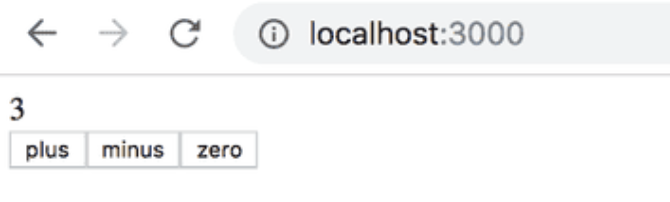
让我们来看一个计数器的实现:

redux arch

action 对应用状态的影响通过 reducer 来定义。在实践中,reducer 是一个接收当前状态和 action 作为参数的函数,它返回一个新状态。

现在为我们的应用定义一个 reducer

1
2
3
4
5
6
7
8
9
10
11
12
13
// the first state is the current state in store, and the function return
// a new state after action.
const counterReducer = (state, action) => {
if (action.type === 'INCREMENT') {
return state + 1;
} else if (action.type === 'DECREMENT') {
return state - 1;
} else if (action.type === 'ZERO') {
return 0;
}

return state;
}

action 的格式如下:

1
2
3
{
type: 'INCREMENT',
}

有了 reducer,我们就可以使用 redux 定义一个 store

1
2
3
4
5
6
7
import { createStore } from 'redux';
// initial state is 0
const counterReducer = (state = 0, action) => {
// ...
};

const store = createStore(counterReducer);

store 有两个核心方法:dispatchsubscribe。函数可以 subscribe 到一个 store,dispatch 接收一个 action 并改变状态,当状态改变时,已 subscribe 到该 store 的函数将被调用。

1
2
3
4
5
6
7
8
9
10
11
12
13
14
const store = createStore(counterReducer);
console.log(store.getState());
store.dispatch({ type: 'INCREMENT' });
console.log(store.getState());
store.dispatch({ type: 'ZERO' });
store.dispatch({ type: 'DECREMENT' });
console.log(store.getState());

// console output
0
3
-1

发布/订阅模式

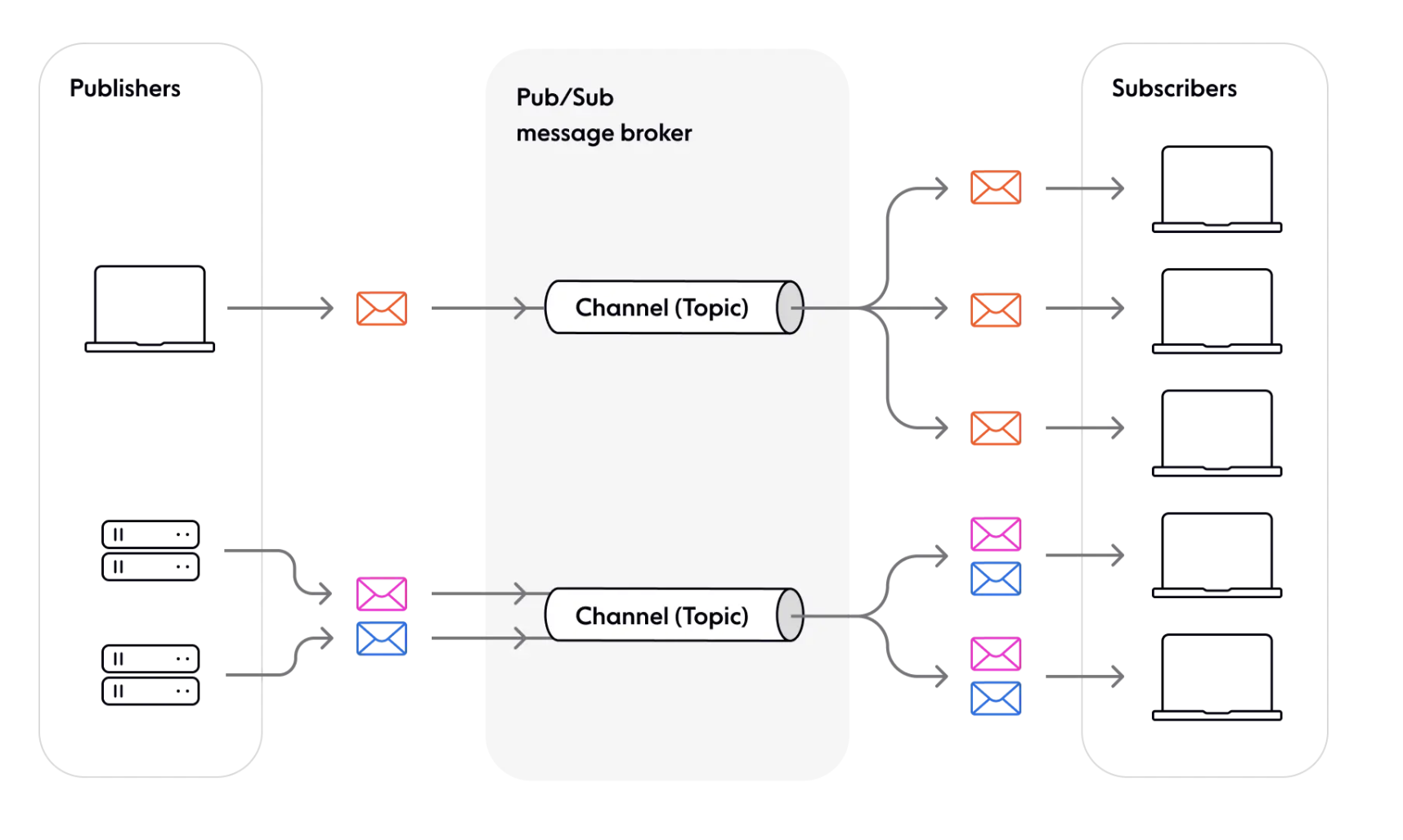
redux 遵循发布/订阅设计模式。其中 store 是订阅和发布消息的通道。dispatch 方法用于向 store 发布消息。当消息被分发时,应用的状态随之改变。subscribe 方法允许函数(订阅者)订阅 store,当状态因分发的消息而发生改变时,这些订阅者会收到通知。

subscribe

发布/订阅模式的一些优势:

  • 组件间松耦合publish(发布)某内容的组件不需要知道谁在 subscribe(订阅)该通道,使系统更加模块化和灵活。

  • 高可扩展性(理论上,Pub/Sub 允许任意数量的发布者与任意数量的订阅者通信)。

Redux 实现

以下代码经过简化,请查阅原始代码:createStore.ts – github

如我们所见,redux 的核心是 createStore 函数,以及 store 的 dispatchsubscribe 方法。我们先跳过其他方法,实现这些核心函数。

首先定义它们的接口:

1
2
3
4
5
6
7
8
9
10
11
12
13
14
15
16
interface Action {
type: string;
[extraProps: string]: any;
}

interface Reducer<T> {
(state: T, action: Action): T;
}
// a store should have dispatch, subscribe methods
interface Store<T> {
dispatch: (action: Action) => void; // setter
subscribe: (listener: () => void) => void;
getState: () => T; // getter
}
// accept a reducer and initial state, return a store object
function createStore<T>(reducer: Reducer<T>, initialState?: T): Store<T>; // create

第一步,实现存储逻辑和基本框架:

1
2
3
4
5
6
7
8
9
10
11
12
13
14
15
16
17
18
19
20
21
22
23
24
25
function createStore<T>(reducer: Reducer<T>, initialState?: T): Store<T> {
// store reduce and state to local variable
let currentReducer = reducer;
let currentState: T | undefined = initialState;
// store listen(function that subscribe to this store) in a map id -> func
let currentListeners: Map<number, ListenerCallback> | null = new Map();
// a id that will assign to the listener
let listenerIdCounter = 0;

function subscribe(listener: () => void) {
// store listener
const listenerId = listenerIdCounter++;
currentListeners.set(listenerId, listener);
}

function dispatch(action: Action) {}

function getState() {}

return {
dispatch,
subscribe,
getState,
}
}

然后实现 dispatch 逻辑。当分发一个 action 时,当前状态会改变,并随后调用所有监听器。

1
2
3
4
5
6
7
8
9
10
11
12
13
14
15
16
17
18
19
20
21
22
23
24
25
26
27
28
29
30
31
32
33
34
function createStore<T>(reducer: Reducer<T>, initialState?: T): Store<T> {
// store reduce and state to local variable
let currentReducer = reducer;
let currentState: T | undefined = initialState;
// store listen(function that subscribe to this store) in a map id -> func
let currentListeners: Map<number, ListenerCallback> | null = new Map();
// a id that will assign to the listener
let listenerIdCounter = 0;

function subscribe(listener: () => void) {
// store listener
const listenerId = listenerIdCounter++;
currentListeners.set(listenerId, listener);
}

function dispatch(action: Action) {
// We will call reducer using action and current state, and update current state
currentState = currentReducer(currentState, action);
// Call all listener one by one after update the state
currentListeners.forEach(listener => {
listener();
});
}

function getState() {
return currentState;
}

return {
dispatch,
subscribe,
getState,
}
}

至此,我们的玩具 redux 已经完成。注意这是一个没有任何错误处理的简化系统,如果你查看 redux 的源码,会发现几乎一半的代码都在处理错误。

介绍 React-Redux

至此 redux 流程的前半部分已经完成,我们现在可以:分发一个 action -> store 状态更新。但如何更新视图呢?我们需要引入 react-redux,React Redux 提供了一对自定义 React hooks,让你的 React 组件能与 Redux store 交互。

useSelector 从 store 状态中读取一个值并订阅更新(getter),而 useDispatch 返回 store 的 dispatch 方法,让你可以分发 action(setter)。当 dispatch 某内容时,传播过程发生,通知所有使用 useSelector 的组件更新它们的值。

1
2
3
4
5
6
7
8
9
10
11
12
13
14
15
16
17
18
19
20
21
22
23
24
25
26
27
28
29
30
31
32
33
34
35
36
37
// store
ReactDOM.render(
<Provider store={store}>
<App />
</Provider >,
document.getElementById('root')
);

export function Counter() {
// getter
const count = useSelector((state) => state.count)
// setter
const dispatch = useDispatch()

return (
<div>
<div className={styles.row}>
<button
className={styles.button}
aria-label="Increment value"
onClick={() => dispatch(increment())}
>
+
</button>
<span className={styles.value}>{count}</span>
<button
className={styles.button}
aria-label="Decrement value"
onClick={() => dispatch(decrement())}
>
-
</button>
</div>
{/* omit additional rendering output here */}
</div>
)
}

订阅(传播)

react-redux 的核心原理是传播(propagation)。传播代表这样一个过程:当状态发生改变时,它会通知根节点,根节点将信息传递给其子节点,信息就这样在整棵树中传播。

我们创建一个 Subscription 接口,包含以下内容:

1
2
3
4
5
6
7
8
9
10
11
12
13
14
15
16
export interface Subscription {
// add children subscription, thus a tree structure is formed
addNestedSub: (listener: VoidFunc) => VoidFunc
// propagate the information to its children nodes
notifyNestedSubs: VoidFunc
// check whether the node is subscribed
isSubscribed: () => boolean
// do something when the node is notified
handleChangeWrapper: VoidFunc
// this is for component to attach their function to this node so that handleChangeWrapper can call it
onStateChange?: VoidFunc | null
// try to subscribe to a store
trySubscribe: VoidFunc
// unsubscribe the node for garbage collection
tryUnsubscribe: VoidFunc
}
1
2
3
4
5
6
7
8
9
10
11
12
13
14
15
16
17
18
19
20
21
22
23
24
25
26
27
28
29
30
31
32
33
34
35
36
37
38
39
40
41
42
43
44
45
46
47
48
49
50
51
52
53
54
55
56
57
58
59
60
61
62
63
64
65
66
67
68
69
70
71
72
73
interface ListenerCollection {
notify: () => void;
subscribe: (callback: () => void) => void;
unsubscribe:
}[]

export function createSubscription(store: any, parentSub?: Subscription) {
// for store unsubscribe function
let unsubscribe: VoidFunc | undefined;
// for store the listeners
// for simplification we don't implement the listener methods here, we will do some wishful thinking and assume that we have a ListenerCollection class which is a link list that stores all the listeners(callback)
let listeners: ListenerCollection;
// Is this specific subscription subscribed (or only nested ones?)
let selfSubscribed = false;

function isSubscribed() {
return selfSubscribed;
}

function trySubscribe() {
// if it is a root node, subscribe its method to store
// else add to parent's listeners
if (!unsubscribe) {
unsubscribe = parentSub
? parentSub.addNestedSub(handleChangeWrapper)
: store.subscribe(handleChangeWrapper);
// create a empty link list of listener for preparing a space for its children nodes
listeners = createListenerCollection();
}
}

function tryUnsubscribe() {
if (unsubscribe) {
// call unsubscribe method, unsubscribe from store or parent listeners
unsubscribe();
unsubscribe = undefined;
// clear its listeners
listeners.clear();
listeners = null;
}
}
// for children nodes to add their listener to parent node
function addNestedSub(listener: () => void) {
const cleanupListener = listeners.subscribe(listener);

return () => {
// unsubscribe
tryUnsubscribe();
// clear its listeners
cleanupListener();
};
}
// force rerender
function handleChangeWrapper() {
subscription.onStateChange();
}

// propagate change
function notifyNestedSubs() {
listeners.notify()
}

const subscription: Subscription = {
addNestedSub,
notifyNestedSubs,
handleChangeWrapper,
isSubscribed,
trySubscribe,
tryUnsubscribe,
};

return subscription;
}

现在我们有了一种与特定 store 关联的订阅创建方式。基本流程是:

  1. store 调用 createSubscription 并调用 trySubscribe 获取一个 root 订阅,我们也可以为 onStateChange 指定一个回调。
  2. storeroot 调用 createSubscription 获取子订阅,当调用 trySubscribe 时,不再将 onStateChange 绑定到 store,而是添加到 root 的监听器列表中。
  3. store 改变时,rootonStateChange 被调用,root 调用 notifyNestedSubs 通知子订阅,子订阅同样递归通知它们自己的子订阅。这样,树中的所有节点都得到了通知,这个过程称为传播

Provider

首先,我们需要将状态存储在某个地方,react-redux 使用 Context 来存储。

以下是一个简单的 Context 示例:

1
2
3
4
5
6
7
8
9
10
11
12
const CounterContext = React.createContext('counter');


class App extends React.Component {
render() {
return (
<CounterContext.Provider value={0}>
<Counter />
</CounterContext.Provider>
);
}
}

作为 Provider 子节点的组件可以通过 useContext 访问 CounterContext

1
2
3
4
5
6
7
const Counter = () => {
const counter = useContext(CounterContext);

return (<div>
{counter}
</div>);
}

我们先来看如何实现 Provider,它创建并将 storesubscription 注入到子组件中。

1
2
3
4
5
6
7
8
9
10
11
12
13
14
15
16
17
18
19
20
21
22
23
24
25
26
27
28
29
30
31
32
33
34
35
36
const ReactReduxContext = React.createContext(null);

function Provider({store, children}){
// provider will create a subscription when store with root is changed.
const contextValue = useMemo(() => {
const subscription = new Subscription(store);
subscription.onStateChange = subscription.notifyNestedSubs;
return {
store,
subscription,
};
}, [store]);
// get initial state
const previousState = useMemo(() => store.getState(), [store]);

// when previousState or contextValue change, try to subscribe again
useLayoutEffect(() => {
const { subscription } = contextValue
// subscribe to new store
subscription.trySubscribe()
// if the state is changed, notify listeners
if (previousState !== store.getState()) {
subscription.notifyNestedSubs()
}

return () => {
subscription.tryUnsubscribe()
subscription.onStateChange = null
}
}, [contextValue, previousState])

return (
// inject subscription and store to children nodes
<ReactReduxContext.Provider value={contextValue}>{children}</ReactReduxContext.Provider>
);
}

useSelector

现在我们可以在子组件中获取 store 和根订阅了,接下来实现 useSelector hook,它向订阅树中添加一个订阅,并在状态改变时强制组件重新渲染。

这里我们使用 useReducer 来通知组件进行重新渲染

1
2
3
4
5
6
function MyComponent() {
// when dispatch is call, the component will rerender
const [state, dispatch] = useReducer((s) => s + 1);

return // ...
}

然后实现一个简化版的 useSelector hook:

1
2
3
4
5
6
7
8
9
10
11
12
13
14
15
16
17
18
19
20
21
22
23
24
25
26
27
28
29
30
31
32
33
34
35
36
37
38
39
40
41
42
43
44
45
46
47
48
49
50
51
52
53
54
55
56
57
58
59
60
61
62
63
64
65
66
67
68
69
70
71
72
73
74
75
76
77
78
79
80
81
82
83
// whenever the state in store is changed, update the state and inform a rerender.
// a selector callback for filter the state we want, equalityFn is for compare state change, here we use strictly equal ===
function useSelector(selector, equalityFn = (a, b) => a === b) {
// get store and root subscription from context
const { store, subscription: contextSub } = useContext(ReactReduxContext);
// utilize the forceRender function for rerender
const [, forceRender] = useReducer((s) => s + 1, 0);
// create a new subscription for the component that call this hook with root subscription
const subscription = useMemo(() => new Subscription(store, contextSub), [
store,
contextSub,
]);
// get current state when re-render
const storeState = store.getState();
// store selected state
let selectedState;
// cache selector, store state, selected state when every time render
const latestSelector = useRef();
const latestStoreState = useRef();
const latestSelectedState = useRef();
useLayoutEffect(() => {
latestSelector.current = selector;
latestStoreState.current = storeState;
latestSelectedState.current = selectedState;
});

// if the cache is needed to update
if (
selector !== latestSelector.current ||
storeState !== latestStoreState.current
) {
// calculate new selected state
const newSelectedState = selector(storeState);
// if new selected state is not equal to the previous state
if (
latestSelectedState.current === undefined ||
!equalityFn(newSelectedState, latestSelectedState.current)
) {
// update state
selectedState = newSelectedState
} else {
// use previous state
selectedState = latestSelectedState.current
}
} else {
// use previous state
selectedState = latestSelectedState.current
}

// attach checkForUpdates to the subscription's onStateChange
//Every time subscriptions are updated, checkForUpdates will be called
useLayoutEffect(() => {
// compare store state with current state
// if it is not equal, update current state
// force re-render the component
function checkForUpdates() {
try {
const newStoreState = store.getState();
const newSelectedState = latestSelector.current(newStoreState);

if (equalityFn(newSelectedState, latestSelectedState.current)) {
return;
}
latestSelectedState.current = newSelectedState;
latestStoreState.current = newStoreState;
} catch (err) {
}
// re-render anyway
forceRender();
}
// attach checkForUpdates to the subscription's onStateChange
subscription.onStateChange = checkForUpdates;
subscription.trySubscribe();
// call checkForUpdates for initialization
checkForUpdates();

return () => subscription.tryUnsubscribe();
}, [store, subscription]);

// return state we want
return selectedState;
}

useReducer

如你所见,这里使用 useReducer 来触发状态更新并触发 render。你可能想知道为什么不用 useState 来做同样的事情。useState 确实可以用来强制重新渲染,但需要编写额外的代码。

1
2
3
4
5
// useReducer
const [, forceRender] = useReducer((s) => s + 1, 0);
// useState
const [, setState] = useState(0);
const forceRender = () => setState(prev => prev + 1);

useDispatch

useDispatch 相对简单,它从 context 中获取 dispatch 函数:

1
2
3
4
useDispatch() {
const { store } = useContext(ReactReduxContext);
return store.dispatch;
}

, , — Nov 28, 2023