---
title: "从零构建 Redux(Redux 源码解读)"
url: https://clean99.github.io/zh/2023/11/28/build-a-redux-from-scratch/
date: 2023.11.28
lang: zh
---
> 状态不过是一个 getter/setter。
## 本文你将学到什么
1. **Redux 与 React-Redux 的设计与实现**:本文深入探讨 Redux 和 React-Redux 的设计与实现,展示它们如何管理应用状态并促进组件间的通信。
2. **状态管理(Getter、Setter)**:你将理解状态管理的基本模式,并能够理解其他任何状态管理工具。
3. **发布/订阅设计模式**:本文解释了发布/订阅模式,这是 Redux 状态更新和通知机制的核心概念。
## 什么是 Redux?
Redux 是一个面向 JavaScript 应用的可预测状态容器。它就像一个功能更强大的 React 状态。React 的状态仅限于各个组件,而 Redux 允许你在一个地方管理整个应用的状态。
Redux 通过将整个应用的状态存储在单一 store 中的一个 JavaScript 对象来解决这个问题。这使得随时间追踪变化、调试,乃至将状态持久化到本地存储并在下次加载时恢复,都变得更加容易。
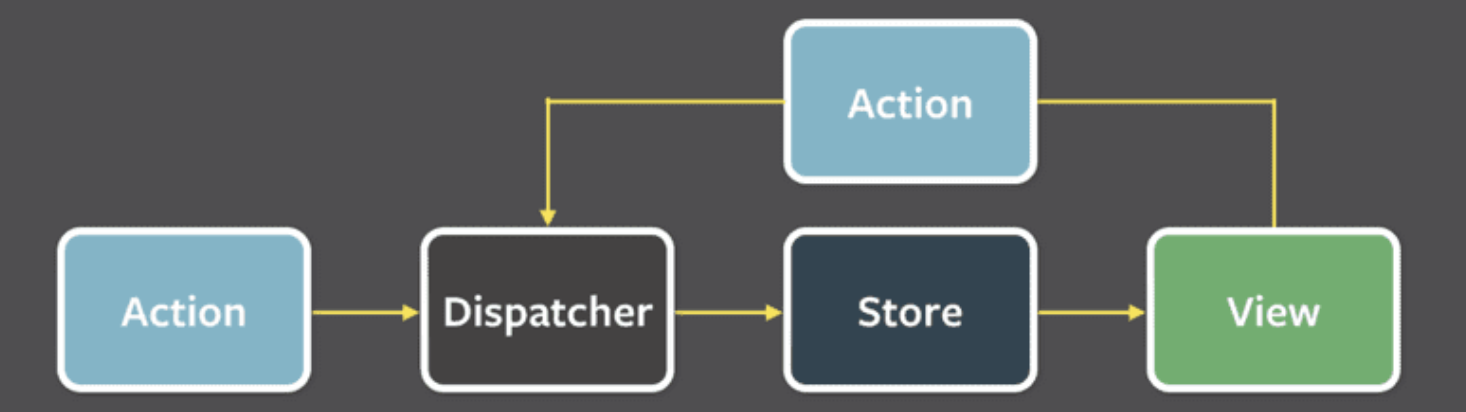
Redux 包含以下几个组成部分:
- **Action**:一个描述发生了什么以及要对状态进行哪些更改的普通对象。
- **Dispatcher**:一个接收 action 对象并将其发送到 store 以改变状态的函数。
- **Store**:持有应用状态的中央仓库。它允许访问状态、分发 action 以及注册监听器。
- **View**:显示 store 提供的数据的用户界面。它可以根据用户交互触发 action。
如果应用中发生了某个操作,例如按下按钮需要改变状态,则通过 action 来完成状态变更。这会触发视图的重新渲染。
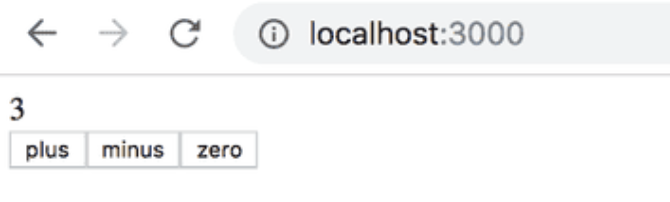
让我们来看一个计数器的实现:
`action` 对应用状态的影响通过 `reducer` 来定义。在实践中,`reducer` 是一个接收当前状态和 action 作为参数的函数,它返回一个新状态。
现在为我们的应用定义一个 `reducer`:
```js
// the first state is the current state in store, and the function return
// a new state after action.
const counterReducer = (state, action) => {
if (action.type === 'INCREMENT') {
return state + 1;
} else if (action.type === 'DECREMENT') {
return state - 1;
} else if (action.type === 'ZERO') {
return 0;
}
return state;
}
```
`action` 的格式如下:
```js
{
type: 'INCREMENT',
}
```
有了 `reducer`,我们就可以使用 `redux` 定义一个 `store`。
```js
import { createStore } from 'redux';
// initial state is 0
const counterReducer = (state = 0, action) => {
// ...
};
const store = createStore(counterReducer);
```
`store` 有两个核心方法:`dispatch` 和 `subscribe`。函数可以 `subscribe` 到一个 store,`dispatch` 接收一个 action 并改变状态,当状态改变时,已 `subscribe` 到该 store 的函数将被调用。
```js
const store = createStore(counterReducer);
console.log(store.getState());
store.dispatch({ type: 'INCREMENT' });
store.dispatch({ type: 'INCREMENT' });
store.dispatch({ type: 'INCREMENT' });
console.log(store.getState());
store.dispatch({ type: 'ZERO' });
store.dispatch({ type: 'DECREMENT' });
console.log(store.getState());
// console output
0
3
-1
```
## 发布/订阅模式
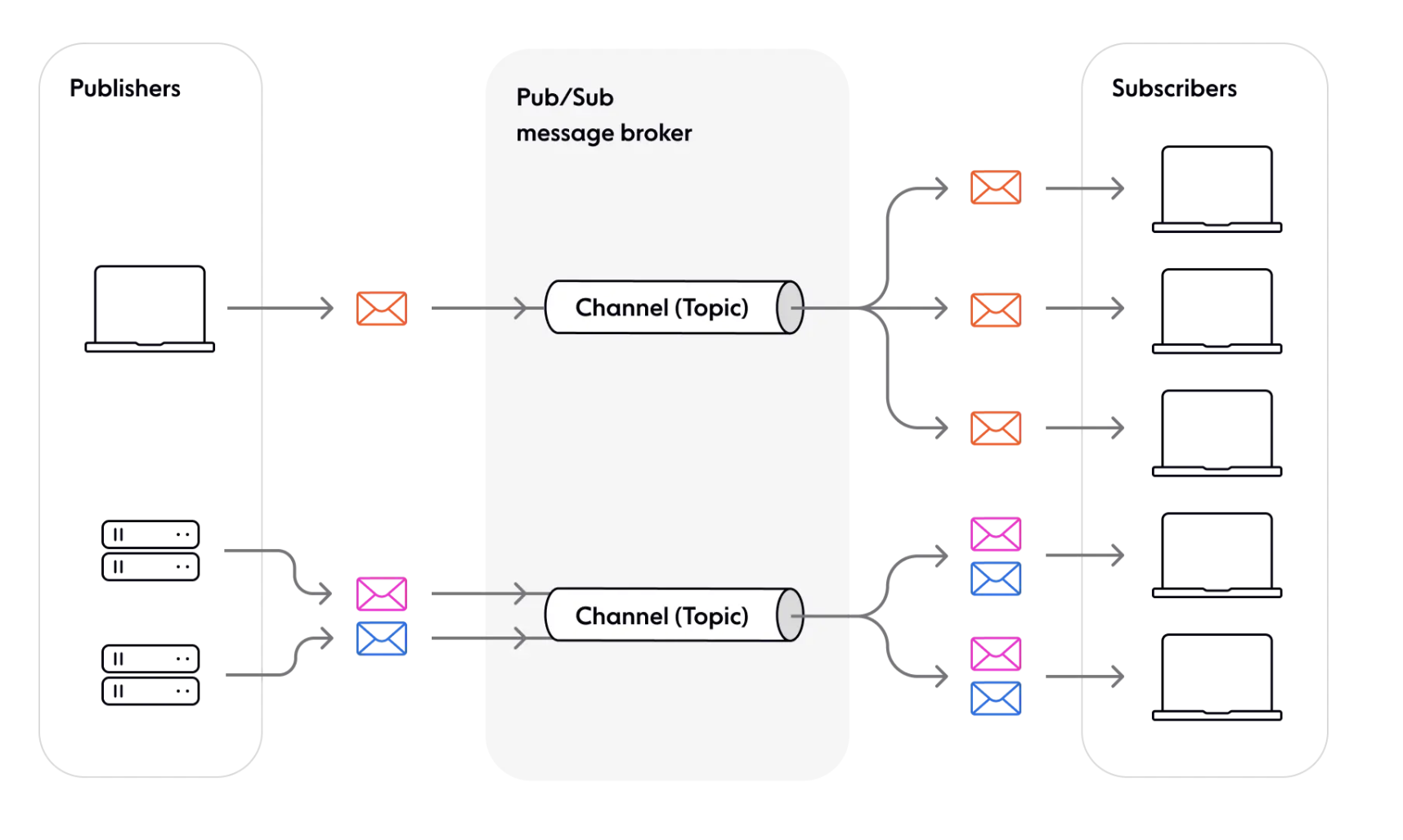
`redux` 遵循**发布/订阅**设计模式。其中 **store** 是订阅和发布消息的通道。**dispatch** 方法用于向 store 发布消息。当消息被分发时,应用的状态随之改变。**subscribe** 方法允许函数(订阅者)订阅 store,当状态因分发的消息而发生改变时,这些订阅者会收到通知。
`发布/订阅`模式的一些优势:
- **组件间松耦合**:`publish`(发布)某内容的组件不需要知道谁在 `subscribe`(订阅)该通道,使系统更加模块化和灵活。
- **高可扩展性**(理论上,Pub/Sub 允许任意数量的发布者与任意数量的订阅者通信)。
## Redux 实现
> 以下代码经过简化,请查阅原始代码:[createStore.ts -- github](https://github.com/reduxjs/redux/blob/e124f0bf9b8a4a64389485b5c4506fc0798d7f3f/src/createStore.ts#L41)
如我们所见,`redux` 的核心是 `createStore` 函数,以及 store 的 `dispatch`、`subscribe` 方法。我们先跳过其他方法,实现这些核心函数。
首先定义它们的接口:
```ts
interface Action {
type: string;
[extraProps: string]: any;
}
interface Reducer {
(state: T, action: Action): T;
}
// a store should have dispatch, subscribe methods
interface Store {
dispatch: (action: Action) => void; // setter
subscribe: (listener: () => void) => void;
getState: () => T; // getter
}
// accept a reducer and initial state, return a store object
function createStore(reducer: Reducer, initialState?: T): Store; // create
```
第一步,实现存储逻辑和基本框架:
```ts
function createStore(reducer: Reducer, initialState?: T): Store {
// store reduce and state to local variable
let currentReducer = reducer;
let currentState: T | undefined = initialState;
// store listen(function that subscribe to this store) in a map id -> func
let currentListeners: Map | null = new Map();
// a id that will assign to the listener
let listenerIdCounter = 0;
function subscribe(listener: () => void) {
// store listener
const listenerId = listenerIdCounter++;
currentListeners.set(listenerId, listener);
}
function dispatch(action: Action) {}
function getState() {}
return {
dispatch,
subscribe,
getState,
}
}
```
然后实现 dispatch 逻辑。当分发一个 action 时,当前状态会改变,并随后调用所有监听器。
```ts
function createStore(reducer: Reducer, initialState?: T): Store {
// store reduce and state to local variable
let currentReducer = reducer;
let currentState: T | undefined = initialState;
// store listen(function that subscribe to this store) in a map id -> func
let currentListeners: Map | null = new Map();
// a id that will assign to the listener
let listenerIdCounter = 0;
function subscribe(listener: () => void) {
// store listener
const listenerId = listenerIdCounter++;
currentListeners.set(listenerId, listener);
}
function dispatch(action: Action) {
// We will call reducer using action and current state, and update current state
currentState = currentReducer(currentState, action);
// Call all listener one by one after update the state
currentListeners.forEach(listener => {
listener();
});
}
function getState() {
return currentState;
}
return {
dispatch,
subscribe,
getState,
}
}
```
至此,我们的玩具 redux 已经完成。注意这是一个没有任何错误处理的简化系统,如果你查看 redux 的源码,会发现几乎一半的代码都在处理错误。
## 介绍 React-Redux
至此 redux 流程的前半部分已经完成,我们现在可以:分发一个 action -> store 状态更新。但如何更新视图呢?我们需要引入 `react-redux`,React Redux 提供了一对自定义 React hooks,让你的 React 组件能与 Redux store 交互。
`useSelector` 从 store 状态中读取一个值并订阅更新(getter),而 `useDispatch` 返回 store 的 `dispatch` 方法,让你可以分发 action(setter)。当 `dispatch` 某内容时,传播过程发生,通知所有使用 `useSelector` 的组件更新它们的值。
```tsx
// store
ReactDOM.render(
,
document.getElementById('root')
);
export function Counter() {
// getter
const count = useSelector((state) => state.count)
// setter
const dispatch = useDispatch()
return (
{count}
{/* omit additional rendering output here */}
)
}
```
## 订阅(传播)
`react-redux` 的核心原理是`传播`(propagation)。`传播`代表这样一个过程:当状态发生改变时,它会通知根节点,根节点将信息传递给其子节点,信息就这样在整棵树中传播。
我们创建一个 Subscription 接口,包含以下内容:
```ts
export interface Subscription {
// add children subscription, thus a tree structure is formed
addNestedSub: (listener: VoidFunc) => VoidFunc
// propagate the information to its children nodes
notifyNestedSubs: VoidFunc
// check whether the node is subscribed
isSubscribed: () => boolean
// do something when the node is notified
handleChangeWrapper: VoidFunc
// this is for component to attach their function to this node so that handleChangeWrapper can call it
onStateChange?: VoidFunc | null
// try to subscribe to a store
trySubscribe: VoidFunc
// unsubscribe the node for garbage collection
tryUnsubscribe: VoidFunc
}
```
```ts
interface ListenerCollection {
notify: () => void;
subscribe: (callback: () => void) => void;
unsubscribe:
}[]
export function createSubscription(store: any, parentSub?: Subscription) {
// for store unsubscribe function
let unsubscribe: VoidFunc | undefined;
// for store the listeners
// for simplification we don't implement the listener methods here, we will do some wishful thinking and assume that we have a ListenerCollection class which is a link list that stores all the listeners(callback)
let listeners: ListenerCollection;
// Is this specific subscription subscribed (or only nested ones?)
let selfSubscribed = false;
function isSubscribed() {
return selfSubscribed;
}
function trySubscribe() {
// if it is a root node, subscribe its method to store
// else add to parent's listeners
if (!unsubscribe) {
unsubscribe = parentSub
? parentSub.addNestedSub(handleChangeWrapper)
: store.subscribe(handleChangeWrapper);
// create a empty link list of listener for preparing a space for its children nodes
listeners = createListenerCollection();
}
}
function tryUnsubscribe() {
if (unsubscribe) {
// call unsubscribe method, unsubscribe from store or parent listeners
unsubscribe();
unsubscribe = undefined;
// clear its listeners
listeners.clear();
listeners = null;
}
}
// for children nodes to add their listener to parent node
function addNestedSub(listener: () => void) {
const cleanupListener = listeners.subscribe(listener);
return () => {
// unsubscribe
tryUnsubscribe();
// clear its listeners
cleanupListener();
};
}
// force rerender
function handleChangeWrapper() {
subscription.onStateChange();
}
// propagate change
function notifyNestedSubs() {
listeners.notify()
}
const subscription: Subscription = {
addNestedSub,
notifyNestedSubs,
handleChangeWrapper,
isSubscribed,
trySubscribe,
tryUnsubscribe,
};
return subscription;
}
```
现在我们有了一种与特定 `store` 关联的订阅创建方式。基本流程是:
1. 以 `store` 调用 `createSubscription` 并调用 `trySubscribe` 获取一个 `root` 订阅,我们也可以为 `onStateChange` 指定一个回调。
2. 以 `store` 和 `root` 调用 `createSubscription` 获取子订阅,当调用 `trySubscribe` 时,不再将 `onStateChange` 绑定到 `store`,而是添加到 `root` 的监听器列表中。
3. 当 `store` 改变时,`root` 的 `onStateChange` 被调用,`root` 调用 `notifyNestedSubs` 通知子订阅,子订阅同样递归通知它们自己的子订阅。这样,树中的所有节点都得到了通知,这个过程称为`传播`。
## Provider
首先,我们需要将状态存储在某个地方,`react-redux` 使用 `Context` 来存储。
以下是一个简单的 `Context` 示例:
```jsx
const CounterContext = React.createContext('counter');
class App extends React.Component {
render() {
return (
);
}
}
```
作为 Provider 子节点的组件可以通过 `useContext` 访问 `CounterContext`:
```jsx
const Counter = () => {
const counter = useContext(CounterContext);
return (
{counter}
);
}
```
我们先来看如何实现 `Provider`,它创建并将 `store` 和 `subscription` 注入到子组件中。
```tsx
const ReactReduxContext = React.createContext(null);
function Provider({store, children}){
// provider will create a subscription when store with root is changed.
const contextValue = useMemo(() => {
const subscription = new Subscription(store);
subscription.onStateChange = subscription.notifyNestedSubs;
return {
store,
subscription,
};
}, [store]);
// get initial state
const previousState = useMemo(() => store.getState(), [store]);
// when previousState or contextValue change, try to subscribe again
useLayoutEffect(() => {
const { subscription } = contextValue
// subscribe to new store
subscription.trySubscribe()
// if the state is changed, notify listeners
if (previousState !== store.getState()) {
subscription.notifyNestedSubs()
}
return () => {
subscription.tryUnsubscribe()
subscription.onStateChange = null
}
}, [contextValue, previousState])
return (
// inject subscription and store to children nodes
{children}
);
}
```
## useSelector
现在我们可以在子组件中获取 `store` 和根订阅了,接下来实现 `useSelector` hook,它向订阅树中添加一个订阅,并在状态改变时强制组件重新渲染。
这里我们使用 `useReducer` 来通知组件进行`重新渲染`。
```jsx
function MyComponent() {
// when dispatch is call, the component will rerender
const [state, dispatch] = useReducer((s) => s + 1);
return // ...
}
```
然后实现一个简化版的 `useSelector` hook:
```tsx
// whenever the state in store is changed, update the state and inform a rerender.
// a selector callback for filter the state we want, equalityFn is for compare state change, here we use strictly equal ===
function useSelector(selector, equalityFn = (a, b) => a === b) {
// get store and root subscription from context
const { store, subscription: contextSub } = useContext(ReactReduxContext);
// utilize the forceRender function for rerender
const [, forceRender] = useReducer((s) => s + 1, 0);
// create a new subscription for the component that call this hook with root subscription
const subscription = useMemo(() => new Subscription(store, contextSub), [
store,
contextSub,
]);
// get current state when re-render
const storeState = store.getState();
// store selected state
let selectedState;
// cache selector, store state, selected state when every time render
const latestSelector = useRef();
const latestStoreState = useRef();
const latestSelectedState = useRef();
useLayoutEffect(() => {
latestSelector.current = selector;
latestStoreState.current = storeState;
latestSelectedState.current = selectedState;
});
// if the cache is needed to update
if (
selector !== latestSelector.current ||
storeState !== latestStoreState.current
) {
// calculate new selected state
const newSelectedState = selector(storeState);
// if new selected state is not equal to the previous state
if (
latestSelectedState.current === undefined ||
!equalityFn(newSelectedState, latestSelectedState.current)
) {
// update state
selectedState = newSelectedState
} else {
// use previous state
selectedState = latestSelectedState.current
}
} else {
// use previous state
selectedState = latestSelectedState.current
}
// attach checkForUpdates to the subscription's onStateChange
//Every time subscriptions are updated, checkForUpdates will be called
useLayoutEffect(() => {
// compare store state with current state
// if it is not equal, update current state
// force re-render the component
function checkForUpdates() {
try {
const newStoreState = store.getState();
const newSelectedState = latestSelector.current(newStoreState);
if (equalityFn(newSelectedState, latestSelectedState.current)) {
return;
}
latestSelectedState.current = newSelectedState;
latestStoreState.current = newStoreState;
} catch (err) {
}
// re-render anyway
forceRender();
}
// attach checkForUpdates to the subscription's onStateChange
subscription.onStateChange = checkForUpdates;
subscription.trySubscribe();
// call checkForUpdates for initialization
checkForUpdates();
return () => subscription.tryUnsubscribe();
}, [store, subscription]);
// return state we want
return selectedState;
}
```
### useReducer
如你所见,这里使用 `useReducer` 来触发状态更新并触发 `render`。你可能想知道为什么不用 `useState` 来做同样的事情。`useState` 确实可以用来强制重新渲染,但需要编写额外的代码。
```tsx
// useReducer
const [, forceRender] = useReducer((s) => s + 1, 0);
// useState
const [, setState] = useState(0);
const forceRender = () => setState(prev => prev + 1);
```
## useDispatch
`useDispatch` 相对简单,它从 context 中获取 `dispatch` 函数:
```tsx
useDispatch() {
const { store } = useContext(ReactReduxContext);
return store.dispatch;
}
```
 Redux 包含以下几个组成部分:
- **Action**:一个描述发生了什么以及要对状态进行哪些更改的普通对象。
- **Dispatcher**:一个接收 action 对象并将其发送到 store 以改变状态的函数。
- **Store**:持有应用状态的中央仓库。它允许访问状态、分发 action 以及注册监听器。
- **View**:显示 store 提供的数据的用户界面。它可以根据用户交互触发 action。
如果应用中发生了某个操作,例如按下按钮需要改变状态,则通过 action 来完成状态变更。这会触发视图的重新渲染。
让我们来看一个计数器的实现:
Redux 包含以下几个组成部分:
- **Action**:一个描述发生了什么以及要对状态进行哪些更改的普通对象。
- **Dispatcher**:一个接收 action 对象并将其发送到 store 以改变状态的函数。
- **Store**:持有应用状态的中央仓库。它允许访问状态、分发 action 以及注册监听器。
- **View**:显示 store 提供的数据的用户界面。它可以根据用户交互触发 action。
如果应用中发生了某个操作,例如按下按钮需要改变状态,则通过 action 来完成状态变更。这会触发视图的重新渲染。
让我们来看一个计数器的实现:
 `action` 对应用状态的影响通过 `reducer` 来定义。在实践中,`reducer` 是一个接收当前状态和 action 作为参数的函数,它返回一个新状态。
现在为我们的应用定义一个 `reducer`:
```js
// the first state is the current state in store, and the function return
// a new state after action.
const counterReducer = (state, action) => {
if (action.type === 'INCREMENT') {
return state + 1;
} else if (action.type === 'DECREMENT') {
return state - 1;
} else if (action.type === 'ZERO') {
return 0;
}
return state;
}
```
`action` 的格式如下:
```js
{
type: 'INCREMENT',
}
```
有了 `reducer`,我们就可以使用 `redux` 定义一个 `store`。
```js
import { createStore } from 'redux';
// initial state is 0
const counterReducer = (state = 0, action) => {
// ...
};
const store = createStore(counterReducer);
```
`store` 有两个核心方法:`dispatch` 和 `subscribe`。函数可以 `subscribe` 到一个 store,`dispatch` 接收一个 action 并改变状态,当状态改变时,已 `subscribe` 到该 store 的函数将被调用。
```js
const store = createStore(counterReducer);
console.log(store.getState());
store.dispatch({ type: 'INCREMENT' });
store.dispatch({ type: 'INCREMENT' });
store.dispatch({ type: 'INCREMENT' });
console.log(store.getState());
store.dispatch({ type: 'ZERO' });
store.dispatch({ type: 'DECREMENT' });
console.log(store.getState());
// console output
0
3
-1
```
## 发布/订阅模式
`redux` 遵循**发布/订阅**设计模式。其中 **store** 是订阅和发布消息的通道。**dispatch** 方法用于向 store 发布消息。当消息被分发时,应用的状态随之改变。**subscribe** 方法允许函数(订阅者)订阅 store,当状态因分发的消息而发生改变时,这些订阅者会收到通知。
`action` 对应用状态的影响通过 `reducer` 来定义。在实践中,`reducer` 是一个接收当前状态和 action 作为参数的函数,它返回一个新状态。
现在为我们的应用定义一个 `reducer`:
```js
// the first state is the current state in store, and the function return
// a new state after action.
const counterReducer = (state, action) => {
if (action.type === 'INCREMENT') {
return state + 1;
} else if (action.type === 'DECREMENT') {
return state - 1;
} else if (action.type === 'ZERO') {
return 0;
}
return state;
}
```
`action` 的格式如下:
```js
{
type: 'INCREMENT',
}
```
有了 `reducer`,我们就可以使用 `redux` 定义一个 `store`。
```js
import { createStore } from 'redux';
// initial state is 0
const counterReducer = (state = 0, action) => {
// ...
};
const store = createStore(counterReducer);
```
`store` 有两个核心方法:`dispatch` 和 `subscribe`。函数可以 `subscribe` 到一个 store,`dispatch` 接收一个 action 并改变状态,当状态改变时,已 `subscribe` 到该 store 的函数将被调用。
```js
const store = createStore(counterReducer);
console.log(store.getState());
store.dispatch({ type: 'INCREMENT' });
store.dispatch({ type: 'INCREMENT' });
store.dispatch({ type: 'INCREMENT' });
console.log(store.getState());
store.dispatch({ type: 'ZERO' });
store.dispatch({ type: 'DECREMENT' });
console.log(store.getState());
// console output
0
3
-1
```
## 发布/订阅模式
`redux` 遵循**发布/订阅**设计模式。其中 **store** 是订阅和发布消息的通道。**dispatch** 方法用于向 store 发布消息。当消息被分发时,应用的状态随之改变。**subscribe** 方法允许函数(订阅者)订阅 store,当状态因分发的消息而发生改变时,这些订阅者会收到通知。
 `发布/订阅`模式的一些优势:
- **组件间松耦合**:`publish`(发布)某内容的组件不需要知道谁在 `subscribe`(订阅)该通道,使系统更加模块化和灵活。
- **高可扩展性**(理论上,Pub/Sub 允许任意数量的发布者与任意数量的订阅者通信)。
## Redux 实现
> 以下代码经过简化,请查阅原始代码:[createStore.ts -- github](https://github.com/reduxjs/redux/blob/e124f0bf9b8a4a64389485b5c4506fc0798d7f3f/src/createStore.ts#L41)
如我们所见,`redux` 的核心是 `createStore` 函数,以及 store 的 `dispatch`、`subscribe` 方法。我们先跳过其他方法,实现这些核心函数。
首先定义它们的接口:
```ts
interface Action {
type: string;
[extraProps: string]: any;
}
interface Reducer
`发布/订阅`模式的一些优势:
- **组件间松耦合**:`publish`(发布)某内容的组件不需要知道谁在 `subscribe`(订阅)该通道,使系统更加模块化和灵活。
- **高可扩展性**(理论上,Pub/Sub 允许任意数量的发布者与任意数量的订阅者通信)。
## Redux 实现
> 以下代码经过简化,请查阅原始代码:[createStore.ts -- github](https://github.com/reduxjs/redux/blob/e124f0bf9b8a4a64389485b5c4506fc0798d7f3f/src/createStore.ts#L41)
如我们所见,`redux` 的核心是 `createStore` 函数,以及 store 的 `dispatch`、`subscribe` 方法。我们先跳过其他方法,实现这些核心函数。
首先定义它们的接口:
```ts
interface Action {
type: string;
[extraProps: string]: any;
}
interface Reducer